Email System Guide
Set up email providers, route emails by purpose, manage templates and suppressions, and verify deliverability — end to end
1. What the Email Module Does
The Email module is the single place to configure every outbound email the platform sends — from one-time passwords and password resets to newsletter blasts and editorial workflow notifications.
Everything email-related lives under Settings → Email in the sidebar.
Here is what you can do with it:
- Configure multiple email accounts — Connect any combination of Custom SMTP, SendGrid, Mailchimp Transactional (Mandrill), AWS SES, Postmark, or Mailchimp Marketing. The first five are per-recipient transactional transports; Mailchimp Marketing is a bulk audience+campaign channel for marketing/newsletter only (see the provider-capability matrix in §6a). Each account has its own credentials, sender identity, rate limits, and webhook secret.
- Route emails by purpose — Map every canonical email purpose (OTP, payment receipts, marketing, newsletter, editorial workflow, etc.) to a specific account. The pipeline reads this mapping at every send.
- Compose and edit templates — Manage HTML and plain-text templates with merge variables. Each template can be assigned to a purpose so the right account ships it.
- Verify wiring before you trust it — The form has a Save & connect primary action that writes the credentials and immediately probes the provider. Each purpose has a Test button that sends a synthetic probe through the resolved account.
- Manage suppressions — Local mirror of bounce / complaint / unsubscribe / GDPR records. Reviewed at every send so the platform doesn't ship to known-bad addresses. Includes a Release all for this email bulk action.
- Read the dashboard — Per-account and per-purpose breakdowns of delivery, bounce, complaint, and unsubscribe rates over a configurable window. Daily volume chart. Top failing purposes.
- Read the logs — Row-level delivery records with filters for account, purpose, status, and bounce class. CSV export gated on the marketing-audience-export permission.
Implementation status: Multi-account routing, purpose mapping, per-account credentials, suppression management, dashboard, logs, template purpose wiring, and the Save & connect flow are all shipped. The Integrations page does not host a parallel email-config modal — email configuration lives solely here.
The big idea in one diagram
Every outbound email follows the same path. A system event picks a purpose; the purpose resolves to an account (with provider + credentials); a template is rendered and merged with variables; the email is wrapped in your branding (and, for non-mandatory mail, an unsubscribe footer); the resolved account's provider ships it; and the result lands as an EmailLog row.
1a. How It Works (Behind the Scenes)
This is the end-to-end sequence the platform runs on every send, whether it's a single OTP or a 50,000-recipient newsletter. Understanding it explains almost every behavior in the rest of this guide — why a purpose remap takes effect instantly, why a disabled account "still sends" through a fallback, and why mandatory mail ignores suppression.
Step by step:
- Trigger. A system action (a reader requests an OTP, a payment succeeds, an editor publishes, the newsletter cron fires) calls the email pipeline with an event, a purpose key, the recipient, and a variables payload.
- Event Registry kill-switch. The pipeline checks the event's
isEnabledflag (§8a). If the event is paused, the send short-circuits to adroppedlog row — except mandatory-transactional events, which ignore the switch, and a registry read failure fails open (sends proceed). - Purpose → Account resolution. The resolver reads
email_purpose_accountsfor the purpose key, picks the primary (isPrimary = true,priority = 0), and if that account is disabled / soft-deleted / last-test-failed, walks the ordered fallbacks by ascendingpriority. If nothing resolves it falls through to the bootstrapdefaultaccount and emits a warning log. - Template + variable merge. The template assigned to the purpose (or supplied by the call site) is loaded;
{{variable}}placeholders in the subject, HTML, and text are replaced with the payload values. - Branding wrap. The rendered body is wrapped via
EmailPreferencesat a single chokepoint —wrapEmailWithPreferences— which applies the logo, page/container colors, brand fonts (Anek Latin + Lora, with a web-safe fallback for clients that don't support web fonts), footer, and social links. This same chokepoint drives the CTA/button color from the configured brand color: any body that still carries the legacy#36A8DFdefault has it rewritten to the admin'sbranding.primaryColor, so buttons and links track the brand setting without re-seeding every template. For non-mandatory classes an unsubscribe footer (one-click HMAC link) is injected; mandatory mail gets no marketing footer. (OTP uses a slimmer content-only variant of this wrapper — see §8b.) - Suppression gate. The recipient is checked against the local suppression list for the email's class. Mandatory-transactional mail (OTP, password reset, payment receipts, GDPR notices) is never gated. A blocked send is logged as
droppedwithsuppressionApplied. - Provider send. The resolved account's credentials are decrypted (AES-256-GCM) and handed to the provider transport (nodemailer for SMTP/SES, the provider SDK/API otherwise). Mailchimp Marketing instead syncs recipients to an audience and creates a campaign (§7a).
- EmailLog. One row is written per send (one summary row per Mailchimp campaign), capturing status,
emailAccountId,purposeKey, class, andmessageId. Later, provider webhooks update that same row with delivery / open / click / bounce / complaint / unsubscribe events.
2. Who Should Use This Guide
| If you are... | You will use this guide for... |
|---|---|
| A Customer admin setting up the platform | Connecting your first email provider, mapping purposes, verifying nothing is broken before launch |
| A Platform operator | Adding additional accounts (e.g. a separate sender for newsletter vs OTP), rotating credentials, releasing suppressions |
| A Marketing operations lead | Reading the dashboard, exporting logs, troubleshooting why a campaign didn't deliver |
| A QA tester | Validating that purpose remaps actually take effect, that the verify-connection flow returns honest signals, that suppressions block sends |
3. Before You Begin — Setup Checklist
Several things must be in place before any email actually leaves the platform.
Must-Have Setup Items
| # | What needs to be set up | Where to check | Why it matters |
|---|---|---|---|
| 1 | At least one email account with working credentials | Admin Console → Settings → Email → Accounts | No account → no send. Every email purpose needs to map to an enabled account. The platform ships a bootstrap default account on first run, but its credentials come from .env and may be placeholders — replace them via the form. |
| 2 | Each canonical purpose mapped to an account | Settings → Email → Purposes | The 14 canonical purposes (OTP, payment receipts, account security, GDPR compliance, registration, subscription lifecycle, editorial publishing, editorial workflow, inquiry follow-up, system notification, transactional test, contact form, marketing campaign, newsletter) must each have a primary account. Unmapped purposes fall back to the bootstrap default and emit a warning log. |
| 3 | Templates assigned to a purpose | Settings → Email → Templates | Each template should have a defaultPurposeKey set so the generic helpers route correctly. Templates without a purpose fall back to system_notification and emit a warning log. The list page shows a small "⚠ no purpose" warning on orphan templates. |
| 4 | Sender domain DNS (SPF / DKIM / DMARC) | Settings → Email → Accounts → click an account → Sender domain DNS card | Misaligned DNS causes deliverability problems even when the credentials work. Click Verify DNS on each account; the resolver runs SPF / DKIM / DMARC / BIMI lookups via Node's resolver — no third-party calls. |
| 5 | Webhook secret + URL configured for SendGrid / Mandrill / Mailchimp Marketing accounts | Settings → Email → Accounts → click an account → Webhook secret card (shows the copyable per-account URL) | Without a verified webhook, delivery / open / click / bounce / complaint events never reach the platform. The dashboard's bounce / complaint / open rates stay at 0% (the sends still go out). SES / Postmark / plain SMTP have no inbound ingestion — see §6a. Step-by-step: §13.4. |
| 6 | Encryption key configured | Server .env → ENCRYPTION_KEY | Account credentials are encrypted at rest with AES-256-GCM via this key. If you rotate the key, every existing account becomes unreadable; ops must plan a key rotation runbook before flipping it. |
| 7 | System purposes seeded in the database | Run npm run db:seed (or the focused tsx prisma/seed-email-purposes.ts) once after deploying the multi-account routing migration | Without the 14 canonical system purposes in email_purposes, every send-test fails with a confusing success: true / "Delivery succeeded but audit log write failed" shape because email_logs.purpose_key has a foreign-key constraint on email_purposes.key that fires on every prisma.emailLog.create. The migration 20260430140000_add_multi_email_account creates the FK but does not seed the system purposes — only the seed script does. Symptom: send-test and even production sends throw P2003 / Foreign key constraint failed on the field: email_logs_purpose_key_fkey. Resolution: run npm run db:seed. See: BUG-EMAIL-01MAY-01 in docs/bug-analysis/email-notifications-buglist-2026-04-06.md for the full RCA. |
How to verify email is actually working
- Go to Settings → Email → Accounts.
- Pick an account and click into it.
- Click Verify connection. A successful probe shows latency in milliseconds; a failure surfaces the provider's actual error message (e.g. Invalid login: 535 Authentication Failed).
- Enter your address in Send a test email to and click Send test email. Check your inbox.
- For each critical purpose (OTP, payment receipts), go to Settings → Email → Purposes and click the per-row Test button. The probe routes through the same account the production pipeline would use.
If all three pass, your wiring is correct.
4. Key Terms in Plain Language
| Term | What it means |
|---|---|
| Email Account | A specific provider connection — Custom SMTP, SendGrid, Mailchimp Transactional, AWS SES, Postmark, or Mailchimp Marketing — with its own credentials, sender name + email, and rate limits. You can have many accounts side by side (e.g. "Newsletter sender" via SendGrid + "OTP sender" via SMTP). |
| Provider | The transport behind an account: smtp / sendgrid / mailchimp_transactional / aws_ses / postmark / mailchimp_marketing. The provider is set at create time and is immutable. |
| Transactional vs marketing-API provider | The first five providers are transactional transports — the platform renders and sends each email per-recipient and owns the unsubscribe footer + suppression. Mailchimp Marketing is the one API-only / bulk provider — Mailchimp performs the send, tracks opens/clicks, and owns the unsubscribe footer. It can only carry marketing-class purposes. See §6a. |
| Sender identity | The From name + From email + optional Reply-To + Return-Path displayed in the recipient's inbox. Set per account. |
| Purpose | A canonical reason an email is sent. Examples: otp, payment_receipt, account_security, newsletter, marketing_campaign, editorial_workflow. Drives routing decisions. There are 14 system purposes; new ones cannot be added through the UI. |
| Email class | A higher-level grouping: mandatory-transactional (OTP, password reset, receipts — never gated by suppression), transactional-lifecycle (welcome / renewal / expiration), operational (workflow / inquiry / system), or marketing (newsletter / campaign). |
| Primary account | The account a purpose routes through by default. Each purpose has exactly one primary, enforced at the database level. |
| Fallback accounts | An ordered list of additional accounts the resolver tries when the primary is disabled / errored / soft-deleted. Accessible via API; UI exposure is a planned follow-up. |
| Template | The HTML and plain-text body of a specific email type, with {{variable}} placeholders. Templates carry a default purpose. The pipeline merges variables at send time and ships through the resolved account. |
| Computed routing | The chip strip on the template editor showing "this template will route through purpose X via account Y". Computed live from the current purpose mapping; updates on every save. |
| Suppression | A "do not send" record for an email address. Created automatically by webhook events (bounce, complaint, unsubscribe), by the GDPR cascade on Reader anonymization, by the nightly provider-list sync, or manually by an admin. |
| Mandatory-transactional carve-out | OTP, password reset, payment receipts, and GDPR notices are never blocked by local suppression. CAN-SPAM treats these as legally required. The carve-out is enforced at the pipeline level and at the suppressions API. |
| Verify connection | A diagnostic that authenticates against the provider without sending an email. SMTP runs nodemailer.verify(); SDK providers make a lightweight authenticated call. Stamps lastTestedAt / lastTestResult / lastTestError on the account row. |
| Save & connect | The primary action on the account form. Saves the account AND immediately runs Verify connection so you get one yes/no answer. |
| Send test email | Sends an actual email to a recipient you specify. Uses the template-render pipeline, including suppression check and the configured sender. |
4a. Concepts: Purposes, Account Routing & Email Classes
Three concepts do most of the work in this module. Get these and the rest of the UI is just plumbing.
Purposes — the why of a send
A purpose is the canonical reason an email is sent. There are 14 system purposes, seeded into email_purposes (key + label + defaultClass + sort order). The pipeline never hardcodes "use SendGrid for OTP" — it says "send the otp purpose," and the purpose-to-account mapping decides the rest. New purposes are a row insert, not a code change, but the UI does not expose adding them.
| Purpose key | Label | Class |
|---|---|---|
otp | One-time password | mandatory-transactional |
payment_receipt | Payment receipt | mandatory-transactional |
account_security | Account security | mandatory-transactional |
gdpr_compliance | GDPR / compliance | mandatory-transactional |
registration | Registration / account welcome | transactional-lifecycle |
subscription_lifecycle | Subscription lifecycle | transactional-lifecycle |
editorial_publishing | Editorial publishing | transactional-lifecycle |
editorial_workflow | Editorial workflow | operational |
inquiry_followup | Inquiry follow-up | operational |
system_notification | System notification | operational |
transactional_test | Transactional test | operational |
contact_form | Contact form | operational |
marketing_campaign | Marketing campaign | marketing |
newsletter | Newsletter | marketing |
Account routing — the how of a send
Each purpose maps to accounts through email_purpose_accounts. Each row has a priority and an isPrimary flag. Exactly one row per purpose is the primary (isPrimary = true, enforced by a partial unique index); the rest are ordered fallbacks. At send time the resolver tries the primary; if it's disabled, soft-deleted, or its last connection test failed, it walks the fallbacks by ascending priority; if none resolve it falls through to the bootstrap default and logs a warning. This is why a purpose remap takes effect on the very next send (the resolver and transporter caches are invalidated on save) and why a disabled account doesn't necessarily break sends.
Email classes — the compliance rules of a send
Every purpose carries a fixed class (defaultClass). The class — not the purpose — decides unsubscribe, branding-footer, and suppression behavior. There are four classes:
| Class | Examples | Unsubscribe footer? | Gated by suppression? | Can be kill-switched? |
|---|---|---|---|---|
| mandatory-transactional | OTP, password reset, payment receipts, GDPR notices | No | Never (CAN-SPAM carve-out) | No (legally required) |
| transactional-lifecycle | account welcome, subscription renewal / expiry, publish notices | No (compliance footer only) | Yes (lifecycle scope) | Yes |
| operational | editorial workflow, inquiry follow-up, system notifications, contact form | No | Yes (operational scope) | Yes |
| marketing | newsletters, marketing campaigns | Yes (one-click HMAC) | Yes (marketing scope) | Yes |
Why this split matters: suppressing
noisy@example.comblocks their marketing mail but never their OTP — because the suppression check is class-aware and mandatory-transactional is carved out. Likewise, a Mailchimp Marketing account is rejected for any non-marketing purpose because injecting a marketing unsubscribe footer onto a transactional email is illegal (§7).
5. Getting Around — The Email Section
The Email section in the sidebar contains seven pages:
| Page | URL | What you do there |
|---|---|---|
| Dashboard | /settings/emails/dashboard | KPI strip (delivery / open / click / bounce / complaint / unsubscribe rates), per-account roll-up, per-purpose roll-up, daily volume chart, top failing purposes, unsubscribe analytics |
| Templates | /settings/emails | Browse, create, edit, activate/deactivate, and test-send templates. Each template carries a purpose; orphan templates show an amber warning |
| Events | /settings/emails/events | The Event Registry — every email event mapped to its purpose, resolved account, and template, with a per-event on/off kill-switch and send-sample-to-self. See §8a |
| Accounts | /settings/emails/accounts | List, create, edit, soft-delete email accounts; verify connection; send test email; rotate webhook secret; verify sender DNS |
| Purposes | /settings/emails/purposes | Map each canonical purpose to a primary account. Drill down to see which templates route through each purpose. Send a per-purpose test |
| Suppressions | /settings/emails/suppressions | Browse local suppressions (with filters), release individual records, release all rows for an email at once, manually add a suppression |
| Logs | /settings/emails/logs | Row-level delivery records with filters (status, template, account, purpose, bounce class). CSV export when permitted |
The Dashboard is intentionally first in the sidebar — it answers "is email flowing right now?" which is what an operator opens the menu to find.
6. Setting Up an Email Account
6.1 Create the account
- Go to Settings → Email → Accounts and click + New email account.
- Fill in Identity:
- Account name — display name in the admin (e.g. Newsletter sender).
- Slug — URL-safe identifier (3–64 chars, lowercase + digits + dashes). Used in webhook URLs. Immutable after creation.
- Description (optional).
- Account is enabled toggle — leave on unless you want to stage the account before going live.
- Pick a Provider: Custom SMTP, SendGrid, Mailchimp Transactional (Mandrill), AWS SES, Postmark, or Mailchimp Marketing. The credentials section adapts to the provider. Provider is immutable after save — to switch providers, create a new account. Before picking, skim §6a so you choose a provider whose capabilities match what you'll send through it (e.g. don't pick Mailchimp Marketing for OTP).
- Enter Credentials:
- SMTP: host, port, username, password, TLS toggle.
- SendGrid / Mandrill: API key.
- AWS SES: Access key ID, secret access key, region.
- Postmark: server token.
- Mailchimp Marketing: Marketing API key, Server prefix (the datacenter — the part after the dash in your key, e.g.
us21), and Default audience (list) ID (the Mailchimp list this account syncs subscribers into and sends campaigns from). There is no host/port — this provider talks to the Marketing REST API, not SMTP.
- Set the Sender identity: from name, from email, optional reply-to and return-path. (For Mailchimp Marketing, From/Reply-To are passed to Mailchimp as the campaign sender; Return-Path is SMTP-only and ignored.)
- (Optional) Set Rate limits: per-second and per-hour token-bucket caps.
- Click Save & connect. The form saves the account, encrypts the credentials at rest, and immediately runs a connection probe. You see one of:
- Saved and connected (142 ms). — credentials are valid.
- Saved, but the connection probe failed: <provider error>. Fix the credentials and click Verify connection again. — the provider rejected the auth. Common cause for Zoho, Gmail, and Outlook: 2FA is enabled and you need an app-specific password instead of the account password.
If you don't want the verify-after-save behavior (e.g. you're just renaming a sender display name), use the Save without verify secondary button.
Mailchimp Marketing accounts verify differently. There is no SMTP transport to probe, so Verify connection calls the Marketing API
GET /ping(it confirms the API key + server prefix are valid, not that the audience id exists). There is also no per-recipient Send test email — a "test" for this provider is a real campaign send (or Mailchimp's own in-app campaign preview). Validate the audience id by sending one small campaign to a test segment.
Worked example — connect a Mailchimp Marketing account
- Provider: Mailchimp Marketing. Account name: Mailchimp newsletter. Slug:
mc-newsletter. - API key:
abc123…def-us21. Server prefix:us21. Default audience ID:a1b2c3d4e5(Mailchimp → Audience → Settings → Audience name and defaults → "Audience ID"). - From name: Hyphen. From email:
hello@yourdomain.com(must be a Mailchimp-verified sending domain). - Save & connect → Saved and connected means the API key + prefix are good. Then register the webhook (§6.4) and map the
newsletter/marketing_campaignpurpose to it (§7).
6.2 What happens to the credentials
- The form sends the credentials object as JSON to
POST /api/settings/email-accounts. - The API encrypts the JSON with AES-256-GCM (
src/lib/encryption.ts) and stores the ciphertext inEmailAccount.credentialsEncrypted. - The plaintext never touches durable storage.
- At send time the resolver decrypts the envelope, hands it to nodemailer, and the result of every send is logged in
EmailLogwithemailAccountId. - On every account save the resolver cache and the nodemailer transporter cache are invalidated, so credential rotations take effect on the next send.
6.3 Editing an existing account
- Click into the account from the Accounts list.
- Non-secret fields (host, port, username, region, TLS toggle) render their current value as input placeholders so you can see what's saved.
- Secret fields (password, API key, secret access key, server token) render the masked preview (
••••••••<last4>) as placeholder. Type a new value to rotate; leave blank to keep current. - Click Save & verify connection to commit and re-probe.
Partial-update safety: typing a single field and saving merges with the existing credential envelope, so the other secrets are preserved rather than overwritten.
6.4 Disabling, deleting, and rotating webhooks
- Disable an account (toggle off and save) when you want to take it out of rotation without losing the row. The audit log records
email_account.disableand surfaces the list of purposes this account is the primary for. - Soft-delete the account from the Danger zone card. The DELETE call is blocked with HTTP 409 if the account is still mapped to any purpose — reassign first at Email → Purposes.
- Rotate the webhook secret from the Webhook secret card. The new secret is shown once with a copy-to-clipboard prompt. Paste it into the provider's webhook config before dismissing the message.
- Copy the webhook URL from the same card. For any account whose provider has inbound event handling (SendGrid, Mandrill, Mailchimp Marketing) the card shows the exact per-account webhook URL with a Copy button — paste it straight into the provider dashboard. Providers without inbound handling (SMTP, AWS SES, Postmark) show a note instead of a URL; the platform does not currently ingest delivery events for them, so their dashboard rates stay at 0% (the sends still go out fine).
6a. Provider capabilities — what works and what doesn't per provider
Not every provider supports every feature. Pick a provider whose capabilities match what the account will carry. The biggest split is transactional transports (SMTP / SendGrid / Mandrill / SES / Postmark — the platform sends each email per-recipient) versus the one marketing-API provider (Mailchimp Marketing — Mailchimp does the bulk send).
| Capability | SMTP | SendGrid | Mandrill (MC Transactional) | AWS SES | Postmark | Mailchimp Marketing |
|---|---|---|---|---|---|---|
| Per-recipient transactional sends (OTP, receipts, lifecycle) | ✅ | ✅ | ✅ | ✅ | ✅ | ❌ (marketing only) |
| Can carry mandatory-transactional purposes | ✅ | ✅ | ✅ | ✅ | ✅ | ❌ blocked |
| Can carry marketing / newsletter purposes | ✅ | ✅ | ✅ | ✅ | ✅ | ✅ |
| Delivery / bounce / complaint webhook → dashboard | ⚠️ via SMTP relay's provider¹ | ✅ | ✅ | ⚠️ not ingested² | ⚠️ not ingested² | ✅ (audience/campaign events) |
| Per-row open/click on the Logs page | — | ✅ guaranteed | ⚠️ best-effort³ | — | — | ❌ campaign-level only⁴ |
| Platform owns the unsubscribe footer (HMAC one-click) | ✅ | ✅ | ✅ | ✅ | ✅ | ❌ Mailchimp owns it |
| Platform owns suppression at send time | ✅ | ✅ | ✅ | ✅ | ✅ | ⚠️ shared⁵ |
| Recipient list owned by | Platform | Platform | Platform | Platform | Platform | Mailchimp audience |
| Connection check (Verify connection) | SMTP verify() | API probe | API probe | SMTP verify() | API probe | Marketing API /ping |
| Per-recipient Send test email | ✅ | ✅ | ✅ | ✅ | ✅ | ❌ (send a real campaign) |
¹ SMTP accounts pointed at SendGrid/Mandrill/SES gateways can still receive events if you register that provider's webhook against the account slug. ² SES (SNS) and Postmark webhooks are not currently ingested — sends succeed but their rates read 0%. ³ Mandrill per-row open/click only lands when its message id matches the stored EmailLog.messageId; campaign-level engagement is always populated. ⁴ Mailchimp Marketing sends in bulk with no per-recipient webhook, so opens/clicks live on the campaign (reconciled by a cron), not on per-recipient log rows. ⁵ The platform filters opted-out / locally-suppressed recipients before syncing them to Mailchimp, and Mailchimp's unsubscribe/cleaned events flow back into the platform suppression list — but Mailchimp is authoritative for the actual send.
Plain-language guidance
- OTP, password reset, payment receipts, account security → a transactional transport (SendGrid or Mandrill recommended for the engagement webhooks; SMTP works but you only get delivery events if you wire that gateway's webhook). Never Mailchimp Marketing — the platform blocks it.
- Newsletters and marketing campaigns → either a transactional transport (you keep per-recipient logs + the platform's own unsubscribe) or Mailchimp Marketing (you get Mailchimp's audience management, deliverability reputation, and reporting, but give up per-recipient logs and hand unsubscribe to Mailchimp).
- If your dashboard rates are all 0%, the cause is almost always "no webhook configured for that provider" — see §13.4. It is not a sending failure.
7. Mapping Purposes to Accounts
Go to Settings → Email → Purposes. Purposes are grouped by class:
- Mandatory — OTP, payment receipts, account security, GDPR compliance.
- Lifecycle — registration, subscription lifecycle, editorial publishing.
- Operational — editorial workflow, inquiry follow-up, system notification, transactional test, contact form.
- Marketing — marketing campaign, newsletter.
For each row:
- Pick a Primary account from the dropdown.
- The row shows context warnings:
- No primary account assigned — sends will fail (mandatory rows show will break critical flows).
- Primary account X is disabled — sends will fail until enabled or reassigned.
- Primary account X is deleted — sends fail until reassigned.
- Cannot save — selected account is disabled — pick an enabled account or enable this one first.
- Cannot save — Mailchimp Marketing account on a non-marketing purpose — a
mailchimp_marketingaccount can only be mapped to themarketing_campaignornewsletterpurpose. Trying to assign it to OTP / receipts / any operational or lifecycle purpose is rejected (it has no per-recipient send and injects a marketing unsubscribe footer that is illegal on transactional mail). This guard runs server-side too, so it can't be bypassed via the API.
- Click Save. The mapping update runs in a Serializable transaction so concurrent edits to the same purpose don't trip the partial unique index.
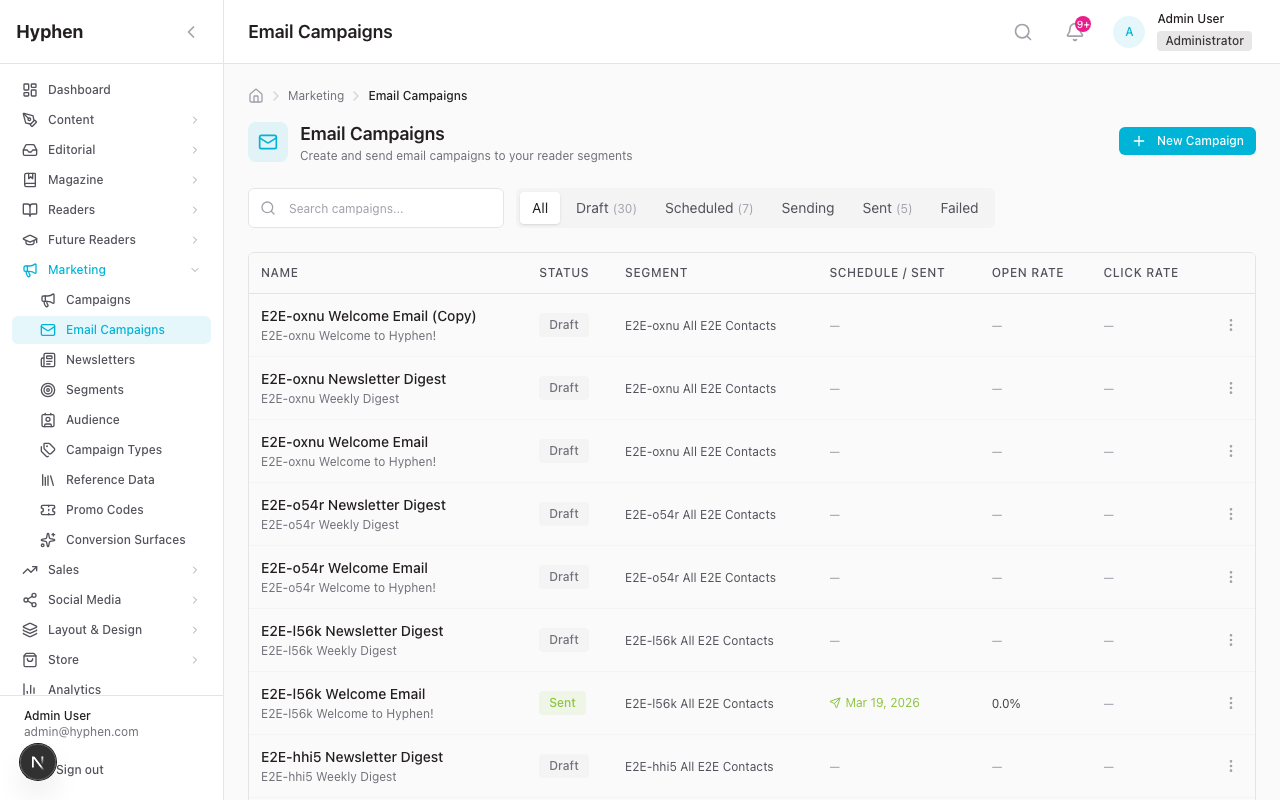
- (Optional) Click the count badge in the Templates column to expand a list of templates routed through this purpose. Each name links to its editor.
- Click Test to send a smoke-test email through the resolved account for this purpose. The dialog shows the resolved account slug ("Test sent via newsletter-sender") so you know the wiring is correct. If the resolved account is a marketing-API provider (Mailchimp Marketing), the dialog changes to Test connection instead — there is no recipient field and no email is delivered; clicking it only verifies the API credentials and connectivity (these providers have no one-off transactional send). For all other providers the recipient field and smoke-test send work as before.
Mandatory purposes show a red badge ("Mandatory — never gated by suppression") so admins know that even an explicit suppression for OTP / password reset / payment receipts is a no-op. The pipeline bypasses suppression for
mandatory-transactionalclass.
7a. Sending marketing campaigns through Mailchimp Marketing
When the marketing_campaign or newsletter purpose resolves to a Mailchimp Marketing account, the platform does not send the campaign itself — it hands the whole job to Mailchimp. This is a different model from every other provider, so it's worth understanding what happens step by step.
What the platform does when you send a campaign (or "Send Now" a newsletter):
- Resolves the account for the campaign's purpose. If it's not a Mailchimp Marketing account, the normal per-recipient SMTP path runs instead — nothing here applies.
- Builds the recipient list from the campaign's segment, enforcing newsletter opt-in, then drops anyone currently suppressed (so a platform-side unsubscribe is never laundered back into a subscribed state).
- Syncs those recipients into the Mailchimp audience (the account's Default audience ID) as
subscribed, tagging each withhyphen-segment-<segmentId>and stamping aHYPHENIDmerge field (the reader id, for webhook correlation). - Creates a Mailchimp campaign targeting a static segment of exactly those recipients, sets the HTML (with Mailchimp's own
*|UNSUB|*unsubscribe footer — not the platform's HMAC footer), and sends or schedules it. - Records the Mailchimp campaign id on the platform campaign, marks it accepted, and writes one summary log row (not one per recipient).
Example. You have a segment "Engaged readers" (1,200 opted-in). You create a campaign, pick a template, and the marketing_campaign purpose is mapped to your mc-newsletter account. On send: the platform filters out 40 suppressed addresses, syncs 1,160 into Mailchimp audience a1b2c3d4e5 tagged hyphen-segment-engaged, creates and sends a Mailchimp campaign to that static segment, and stores mailchimpCampaignId. Twenty minutes later the stats cron pulls Mailchimp's report and the campaign's delivered / opened / clicked / bounced / unsubscribed counters fill in.
What works:
- Audience management, send reputation, and deliverability are Mailchimp's.
- Engagement (opens / clicks / bounces / unsubscribes) is reconciled back onto the campaign counters every ~20 minutes by the
sync-mailchimp-campaign-statscron. - A Mailchimp-side unsubscribe (or "cleaned"/abuse) flows back into the platform suppression list (class
marketing) via the marketing webhook, so it also suppresses your platform-owned (SMTP/SendGrid) marketing sends. Unsubscribe is bidirectional. - Re-sending the same campaign is blocked once it has a Mailchimp campaign id and is
accepted(idempotency guard).
What doesn't work / what's different:
- No per-recipient logs. The Logs page shows one summary row per Mailchimp campaign, not one row per recipient. Per-recipient open/click is not available — use the campaign counters / the Mailchimp report.
- Unsubscribe is Mailchimp's. The email carries Mailchimp's unsubscribe footer, not the platform's one-click HMAC link. Don't expect the platform's
/unsubscribepage for these sends. - Scheduling uses the campaign's scheduled time if set in the future; otherwise it sends immediately.
- Opt-in is enforced and not force-sendable through this path — non-consented contacts are never pushed to Mailchimp.
- GDPR: when a reader is anonymized, the platform also permanently deletes them from every Mailchimp Marketing audience (best-effort, after the local erasure commits).
Prerequisite: the account's Default audience ID must be set, and its webhook (§6.4 / §13.4) registered, or you'll get campaigns that send but never report engagement and never reconcile unsubscribes.
8. Email Templates
8.1 Browsing and creating
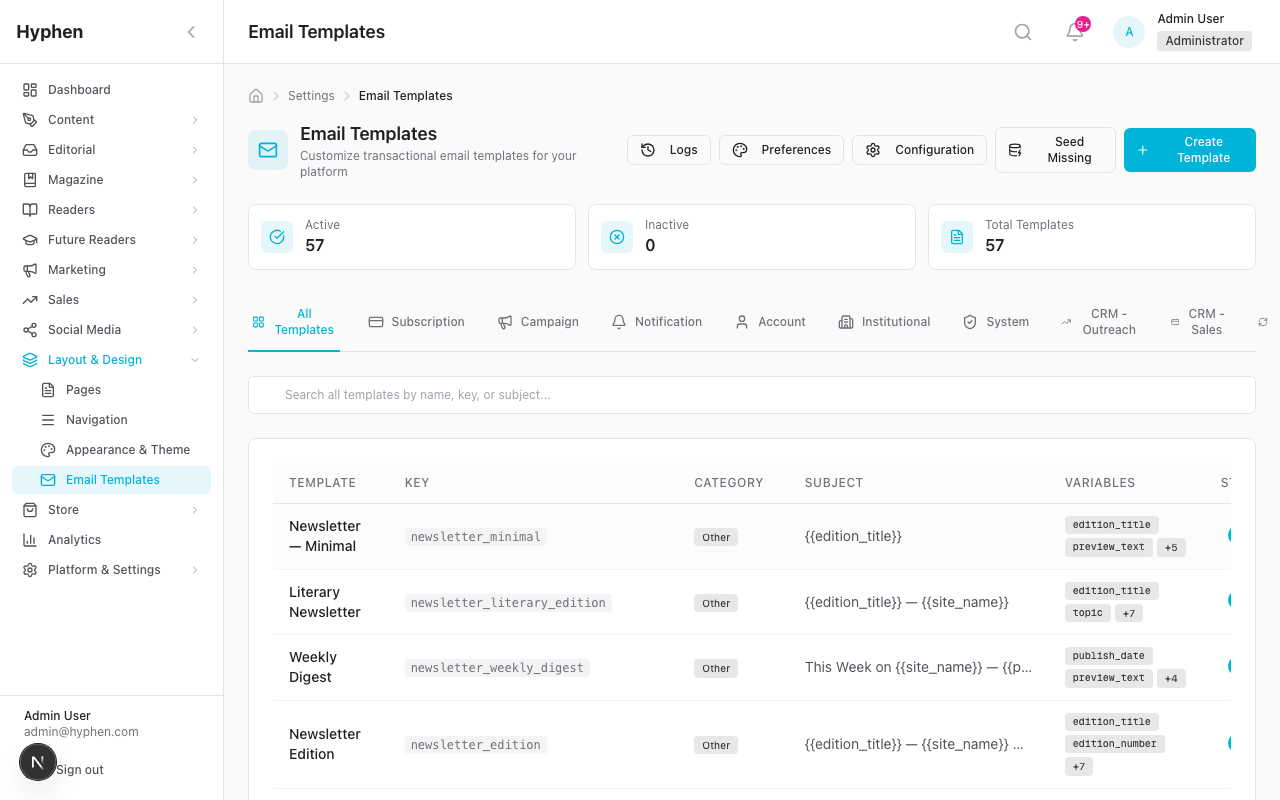
Go to Settings → Email → Templates. Each row shows:
- Template name (with
purpose: <key>underneath, or an amber ⚠ no purpose warning). - Key, subject, variables.
- Active/inactive toggle.
- Edit / delete / send-test actions.
Click + Create template to make a new one. Required: key (lowercase + digits + underscores), display name, subject, HTML content. Optional: text content, variables, and Email purpose — pick from the canonical 14 so the template routes correctly. Without a purpose, the template will fall back to system_notification when shipped through the generic helpers.
8.2 Editing
The editor shows a chip strip at the top:
- Purpose: <key> — the assigned purpose.
- Account: <slug> — the account the resolver currently picks for that purpose. Updates live on save.
- No account assigned (warning) — purpose has no primary; sends through this template will fail.
Below the chips you can:
- Edit the HTML and plain-text bodies side-by-side with live preview.
- Insert variables from the variable palette.
- Change the Email purpose dropdown — saving updates
defaultPurposeKey. The chip strip refreshes immediately.
8.3 Send test email (template-level)
Click Send test email to open the test modal. The modal:
- Shows you which account this test will route through ("Routing through Newsletter Sender (newsletter-sender, sendgrid) via the newsletter purpose — same path production sends would use").
- Lets you fill in template variables.
- Has a Force transactional_test route checkbox — opt-out of mirroring production routing for cases where you specifically want to probe the bootstrap account.
Click Send Test Email. Behind the scenes the test goes through sendAndLogEmail so it appears in EmailLog with the right purposeKey + emailAccountId.
If the template has no purpose, the test falls back to transactional_test and the modal shows an amber notice. Set a purpose on the template to make the test mirror production.
8a. The Event Registry (Settings → Email → Events)
The Event Registry answers the question "which template fires when X happens, through which account?" without grepping the codebase. Every email the platform can send is registered as an event, and this page shows the whole Event → Purpose → Account → Template chain in one searchable table.
What each row shows
| Column | Meaning |
|---|---|
| Event | The event key + human label (e.g. subscription_cancelled — "Subscription cancelled") |
| Module | Which platform module owns the event — filter by module chips at the top |
| Template | The EmailTemplate the event resolves to, with its last-edited time. A blank template shows "not yet implemented" and the Send Sample button is disabled |
| Purpose | The canonical EmailPurpose that drives account routing |
| Account | The resolved primary account for that purpose (what will actually send) |
| Recipient | reader / admin / cron_broadcast — who receives it |
| Class | The email class (mandatory-transactional / transactional-lifecycle / operational / marketing / newsletter) |
| Enabled | The per-event kill-switch toggle (see below) |
Use the module chips and the search box (matches event key, label, or template key) to find an event fast. Events that exist in the database but are no longer in the code manifest show a "Retired" badge so you can tell live events from leftovers.
Per-event kill-switch
Each row has an Enabled toggle. Turning an event off makes its sends short-circuit at the pipeline: nothing goes out, and each attempt is logged as dropped with a clear reason (and an audit-log entry records who toggled it). This is the safe way to pause one event during an incident — e.g. silence newsletter during a bounce spike — without disabling a whole account or purpose.
Two guardrails:
- Mandatory-transactional events cannot be silenced. OTP, password reset, and payment receipts ignore the kill-switch — these are legally required, so there is deliberately no off switch.
- Fail-open. If the registry table itself can't be read, sends proceed rather than being blocked — a registry outage never takes down email.
Send a sample to yourself
Each row has a Send Sample button. It renders the event's template with placeholder data and sends it only to your own admin email (the recipient is fixed server-side — you cannot send a sample to anyone else). Use dry-run to preview the rendered subject + HTML without sending — dry-run works even when the event is disabled, so you can check a body before re-enabling it. Sample sends are rate-limited per admin.
Permissions & audit: viewing the registry needs email-settings read; toggling the kill-switch needs email-settings manage and writes an audit-log entry (
enable/disable). The page is backed byGET /api/settings/email-events,PATCH /api/settings/email-events/[eventKey], andPOST /api/settings/email-events/[eventKey]/send-sample(§15).
8b. OTP, welcome, and branding behavior
A few high-traffic transactional emails behave in ways worth calling out explicitly, because they were reworked to be admin-editable and brand-aware.
OTP is template-driven
The one-time-passcode email is not a hardcoded body. The send path resolves the editable otp_verification template from Settings → Email → Templates (subject, HTML, and text), substitutes {{otp_code}}, {{site_name}}, {{support_email}}, {{expiry_minutes}}, and ships it. The verification email an admin previews in the editor is the one that actually goes out. If the DB template is missing, the send falls back to an identical built-in copy so OTP never breaks.
OTP is wrapped with a slim, content-only variant of the branding wrapper (wrapOtpEmailWithPreferences) rather than the full DOCTYPE/table/MSO shell — it keeps the payload small and matches the standard header/footer + brand font. The actual code is placed in a hidden preheader so Gmail's inbox snippet shows the code rather than raw CSS. OTP is mandatory-transactional: no unsubscribe footer, never gated by suppression.
Account welcome vs subscription welcome
There are two distinct welcome templates, and they fire at different moments:
| Template key | Fires when | Class |
|---|---|---|
account_welcome | A reader first creates a free account — regardless of method (password / OTP / OAuth). | transactional-lifecycle |
subscription_welcome | A paid subscription activates. | transactional-lifecycle |
A reader who signs up free and later subscribes receives both, at the two different events. Editing one does not affect the other.
The gated /start CTA
Welcome and lifecycle emails point their primary "Start Reading" button at {{site_url}}/start rather than a deep link. /start is a gated entry route: an unauthenticated click lands on sign-in first and then forwards the reader to the right place, so the CTA works whether or not the recipient already has a live session. Keep this destination when editing those templates.
Configuration Reference
Everything in this section is set in Settings → Email unless a backend/env location is given. Use it as the lookup for "what is this field and where do I set it?"
Email account fields (Settings → Email → Accounts)
Each account is one sending identity backed by one provider. Stored in email_accounts.
| Field / Option | What it does | Type | Mandatory? | Default | Where configured | Role |
|---|---|---|---|---|---|---|
| Name | Human label for the account in the admin UI | text | Yes | — | Accounts → Add/Edit | email-settings manage |
| Slug | Stable identifier used in webhook URLs (/^[a-z0-9-]{3,64}$/) | text | Yes | — | Accounts → Add | email-settings manage |
| Description | Free-text note | text | No | — | Accounts → Edit | email-settings manage |
| Provider | Sending backend: smtp, sendgrid, mailchimp_transactional, mailchimp_marketing, aws_ses, postmark | enum | Yes | — | Accounts → Add | email-settings manage |
| Enabled | Whether the account is eligible to send (isEnabled) | toggle | No | off | Accounts → Edit | email-settings manage |
| Sender name | From-header display name (senderName) | text | Yes | — | Accounts → Edit | email-settings manage |
| Sender email | From-header address (senderEmail) | Yes | — | Accounts → Edit | email-settings manage | |
| Reply-to email | Optional Reply-To header (replyToEmail) | No | sender email | Accounts → Edit | email-settings manage | |
| Return-path email | Bounce / envelope-from, SMTP only (returnPathEmail) | No | — | Accounts → Edit | email-settings manage | |
| Credentials | Per-provider secret envelope (credentialsEncrypted) — SMTP host/port/user/pass/secure, or provider API key, or AWS access key/secret/region, or Postmark server token | encrypted JSON | Yes | — | Accounts → Edit | email-settings manage |
| Webhook secret | Verifies inbound provider event webhooks (webhookSecretEncrypted) | encrypted | No | — | Accounts → Rotate webhook | email-settings manage |
| Mailchimp audience ID | Audience for mailchimp_marketing sends (mailchimpAudienceId) | text | Marketing only | — | Accounts → Edit | email-settings manage |
| Rate limit / second | Per-account send throttle (rateLimitPerSecond) | number | No | provider default | Accounts → Edit | email-settings manage |
| Rate limit / hour | Hourly send throttle (rateLimitPerHour) | number | No | provider default | Accounts → Edit | email-settings manage |
Connection and DNS health (lastTestedAt, lastTestResult, dnsStatus) are read-only probe results refreshed by the Verify connection and Verify sender DNS actions.
Purpose → account mappings (Settings → Email → Purposes)
A purpose is a canonical sending reason; the mapping (email_purpose_accounts) decides which account sends it, with priority/isPrimary for fallback (priority 0 = primary). The system-seeded purpose keys (from prisma/seed-email-purposes.ts):
| Purpose key | Used for |
|---|---|
otp | One-time passcodes |
payment_receipt | Payment / billing receipts |
account_security | Password reset, security alerts |
gdpr_compliance | GDPR / data-request emails |
registration | Account welcome / sign-up |
subscription_lifecycle | Subscription welcome, renewal, cancellation |
editorial_publishing | Publication notifications |
editorial_workflow | Submission status, review requests |
inquiry_followup | CRM / outreach follow-ups |
system_notification | Generic system mail (fallback) |
transactional_test | Bootstrap / test-route account |
contact_form | Contact-form submissions |
marketing_campaign | Marketing campaigns |
newsletter | Newsletter editions |
| Field / Option | What it does | Type | Mandatory? | Default | Where configured | Role |
|---|---|---|---|---|---|---|
| Primary account | Account that sends a purpose (isPrimary, priority 0) | select | Yes | — | Purposes → Edit | email-settings manage |
| Fallback accounts | Tried in priority order when primary is disabled / failed | list | No | none | Purposes → Edit | email-settings manage |
| Default class | EmailClass the purpose always sends as (defaultClass) — drives unsubscribe / branding / compliance headers | enum | Yes (seeded) | per purpose | backend (seed-email-purposes.ts) | system |
Template fields (Settings → Email → Templates)
Stored in email_templates.
| Field / Option | What it does | Type | Mandatory? | Default | Where configured | Role |
|---|---|---|---|---|---|---|
| Key | Unique template identifier (key) | text | Yes | — | Templates → Create | email-settings manage |
| Name | Display name | text | Yes | — | Templates → Edit | email-settings manage |
| Subject | Subject line (may contain variables) | text | Yes | — | Templates → Edit | email-settings manage |
| HTML content | Rendered HTML body (htmlContent) | HTML | Yes | — | Templates → Edit | email-settings manage |
| Text content | Plain-text fallback (textContent) | text | No | — | Templates → Edit | email-settings manage |
| Variables | Declared placeholders (variables[]) | list | No | — | Templates → Edit | email-settings manage |
| Email purpose | Default purpose for routing (defaultPurposeKey) | select | No (warned) | — | Templates → Edit | email-settings manage |
| Active | Whether the template can be used (isActive) | toggle | No | on | Templates → Edit | email-settings manage |
Common template variables
Variables use {{snake_case}} and are substituted at render time. The ones actually used across seeded templates:
| Variable | Meaning |
|---|---|
{{site_name}} / {{site_url}} | Platform name and base URL |
{{support_email}} | Support contact address |
{{user_name}} / {{first_name}} | Recipient name |
{{action_url}} / {{verification_link}} / {{reset_link}} / {{login_link}} | Primary CTA / verification / reset / login links |
{{otp_code}} | One-time passcode (OTP emails) |
{{plan_name}} / {{plan_type_label}} / {{plan_features_html}} / {{plan_features_text}} | Subscription plan details |
{{from_plan_name}} / {{to_plan_name}} | Plan change (upgrade/downgrade) |
{{subscription_code}} / {{coupon_code}} / {{promo_code}} | Subscription / discount codes |
{{amount}} / {{total_amount}} | Payment amounts |
{{article_url}} / {{title}} / {{author_name}} | Editorial / publication content |
{{submission_link}} / {{review_link}} / {{editor_notes}} / {{status}} | Editorial-workflow details |
{{institution_name}} / {{seats_total}} / {{seats_used}} / {{seats_remaining}} / {{end_date}} | Institutional accounts |
Declare every variable a template uses in its Variables list so editors know what is available.
Provider environment variables (backend / .env)
Provider credentials are normally stored encrypted per account in the UI. These env vars seed the bootstrap account and back legacy / integration paths:
| Env var | Provider | What it does |
|---|---|---|
SMTP_HOST | SMTP | SMTP server hostname |
SMTP_PORT | SMTP | SMTP server port |
SMTP_SECURE | SMTP | TLS on/off |
SMTP_USER | SMTP | SMTP username |
SMTP_PASS / SMTP_PASSWORD | SMTP | SMTP password |
SENDGRID_API_KEY | SendGrid | API key for sending |
SENDGRID_WEBHOOK_VERIFICATION_KEY | SendGrid | Verifies inbound Event Webhook signatures |
MAILCHIMP_API_KEY | Mailchimp | API key |
MAILCHIMP_SERVER_PREFIX | Mailchimp | Data-center prefix (e.g. us21) |
MAILCHIMP_AUDIENCE_ID | Mailchimp Marketing | Default audience for campaigns |
MAILCHIMP_WEBHOOK_KEY | Mailchimp | Verifies inbound webhook calls |
Event-registry settings (Settings → Email → Events)
Backed by email_event_registry; upserted at boot from the code manifest (src/lib/email/eventRegistry.ts).
| Field / Option | What it does | Type | Mandatory? | Default | Where configured | Role |
|---|---|---|---|---|---|---|
| Event key | Unique event identifier (eventKey) | text | Yes | — | backend (manifest) | system |
| Module | Owning module (module) | text | Yes | — | backend (manifest) | system |
| Template key | Template the event resolves to (templateKey) | select | No | — | backend (manifest) | system |
| Purpose key | Purpose that drives routing (purposeKey) | select | Yes | — | backend (manifest) | system |
| Enabled | Per-event kill-switch (isEnabled) | toggle | No | on | Events → toggle | email-settings manage |
Mandatory-transactional events (OTP, password reset, payment receipts) ignore the kill-switch — they cannot be disabled.
Unsubscribe & suppression settings (Settings → Email → Suppressions)
Stored in email_suppressions; checked before every send. Sources: bounce_hard, bounce_soft, complaint, unsubscribe, manual, provider_sync, gdpr.
| Field / Option | What it does | Type | Mandatory? | Default | Where configured | Role |
|---|---|---|---|---|---|---|
| Suppressed address | Email blocked from future sends | Yes | — | Suppressions → Add | email-settings manage | |
| Scope | Which classes the suppression applies to (EmailSuppressionScope) | enum | Yes | — | Suppressions → Add | email-settings manage |
| Source | How it was added (EmailSuppressionSource) | enum | auto | — | system / webhook / cron | system |
| Release | Remove a suppression so the address can receive again | action | — | — | Suppressions → Release | email-settings manage |
| Reader unsubscribe | Reader-driven opt-out via /api/reader/unsubscribe, recorded as unsubscribe source | link | — | — | reader email footer | reader |
9. Reading the Email Dashboard
Go to Settings → Email → Dashboard. Pick a window (24h / 7d / 30d / 90d).
9.1 KPI strip
- Total — provider-attempt count. Excludes locally-suppressed sends (those are surfaced separately).
- Delivery rate —
delivered_or_better / provider_attempts, wheredelivered_or_better = delivered + spam + unsubscribed. - Open rate —
opened / delivered_or_better. - Click rate —
clicked / delivered_or_better. - Bounce rate —
bounced / provider_attempts. - Complaint rate —
spam / delivered_or_better. - Unsubscribe rate —
unsubscribed / delivered_or_better.
These denominators are deliberate. status is the delivery lifecycle (a single latest-state per row); opens and clicks are not statuses — a delivered+opened email keeps status='delivered' and carries an openCount > 0. So opened / clicked are counted from the per-row engagement columns (rows with openCount/clickCount > 0), which is why they are not added into the delivery denominators (that would double-count delivered rows).
Engagement requires webhooks. Open/click rates are populated by provider open/click webhooks writing per-row counts (SendGrid is the guaranteed path; Mandrill is best-effort). Mailchimp Marketing campaigns have no per-recipient webhook, so their opens/clicks are reconciled onto the campaign counters by the
sync-mailchimp-campaign-statscron, not onto per-recipient log rows — they show on the campaign, not in the per-row dashboard engagement.
9.2 Suppressed-locally panel
If any send was short-circuited by the local suppression list during this window, a separate banner shows the count and links to Email → Suppressions. These rows do not contribute to the rates above.
9.3 Daily volume chart
Inline SVG stacked bars per day, segments colored by status (delivered, sent-no-event-yet, bounced, complained, failed/dropped, unsubscribed). Hover for per-segment counts.
9.4 Top failing purposes
Top 5 purposes by (bounced + complained) / provider_attempts. Threshold: at least 3 sends. Each row links to Logs filtered by that purpose so you can investigate.
9.5 By account / By purpose roll-ups
Per-row: total, delivered, bounced, complaints. Each row in By account deep-links to Logs filtered by that account.
9.6 Unsubscribe analytics
Reason breakdown, category breakdown, and a daily-trend bar chart for the same window. (Aggregate analytics belong on the Dashboard.)
10. Reading the Email Logs
Go to Settings → Email → Logs. Compact MetricCard strip at the top: total / sent / delivered / open rate / click rate / bounced / failed. The Opens and Clicks columns show the real per-recipient counts (incremented from the provider's open/click webhooks); a row's detail modal shows the open/click timestamps in the timeline.
Filters:
- Search by recipient or subject.
- Status — pending / sent / delivered / dropped / deferred / bounced / failed / spam / unsubscribed. (These mirror the actual delivery-lifecycle states. Opens/clicks are engagement counts, not statuses, so they are columns rather than status filters.)
- Template — restrict to one template.
- Account — restrict to one account.
- Purpose — restrict to one purpose.
- Bounce class — hard / soft / block / spam / content (only relevant when status is bounced).
Per-row engagement is provider-dependent (see §6a): SendGrid populates per-row opens/clicks reliably; Mandrill is best-effort; Mailchimp Marketing writes one summary row per campaign (no per-recipient rows), so its opens/clicks appear on the campaign, not here.
Every status renders a badge — including
dropped/pending/deferredrows (e.g. the locally-suppressed sends in the suppressed-locally banner) — and any unrecognized status falls back to a neutral "Unknown" badge instead of breaking the page.
- Clear resets all filters.
CSV export is gated on the MARKETING_AUDIENCE_EXPORT permission. The export mirrors the active filter set so the file matches what's on screen.
The Logs page is row-level triage. For aggregate breakdowns (by account, by purpose, unsubscribe analytics) use the Dashboard.
11. Suppressions
Go to Settings → Email → Suppressions. The page is a single table with filters (search by email, source, "include released").
11.1 Where suppressions come from
| Source | When it fires |
|---|---|
bounce_hard | Webhook reports a hard bounce or provider drop. Address blocked across all classes. |
bounce_soft | Webhook reports a deferred / soft bounce. The row tracks bounceCount; sends start blocking once count ≥ 3. |
complaint | Webhook reports a spam report. Marketing-class only (CAN-SPAM transactional carve-out — OTP / receipts keep flowing). |
unsubscribe | RFC 8058 one-click unsubscribe or List-Unsubscribe header click. Marketing-class only. |
provider_sync | Nightly cron mirrors the provider's own suppression list (SendGrid bounce / block / spam_reports / asm endpoints). |
manual | Admin added via the Add manually modal. |
gdpr | Reader anonymization cascade writes a global suppression keyed on the original email so future imports don't re-trigger sends. |
11.2 Releasing a suppression
- Single row: click Release on the row, optionally enter a reason, confirm.
- All rows for one email: when an address has multiple active rows (e.g. global hard-bounce + marketing complaint), the row exposes a Release all (N) button. One click releases every active row for the address; each release emits its own audit-log entry.
- Resurrection: a future bounce / complaint webhook automatically resurrects a released row, so manual releases are not permanent if the underlying problem persists.
11.3 Adding a manual suppression
Click Add manually. Pick an email, optional class scope (All classes, Marketing only, Lifecycle, Operational), and reason. The API rejects manual suppressions for the mandatory-transactional class — you cannot block OTP / password reset / payment receipts via the suppressions UI.
12. The Save & Connect Flow vs Diagnostics
There are three distinct verify-style actions on an account. They mean different things:
| Action | Where | What it does |
|---|---|---|
| Save & connect (primary save button) | New / edit account form | Saves the account AND runs Verify connection. One yes/no answer to "did this actually work?" — the canonical setup action. |
| Verify connection (Diagnostics card) | Existing account's edit page | Re-runs the provider auth probe without saving. Safe to run anytime. Stamps lastTestedAt on the row. |
| Send test email (Diagnostics card) | Existing account's edit page | Sends an actual templated email to a recipient you specify. Goes through the full template render + suppression check + pipeline. |
The setup action is Save & connect rather than a generic "Test connection," because it commits as well as probes. Verify connection and Send test email have separate Diagnostics cards on the account detail page; Save & connect / Save without verify live in the form's action bar.
13. Common Problems
13.1 "Failed to send test email: Invalid login: 535 Authentication Failed"
Provider rejected your credentials. Most common cause for Zoho, Gmail, and Outlook: 2FA is enabled and the SMTP gateway needs an app-specific password, not your regular login. Generate one in the provider's security settings and paste it into the SMTP password field.
13.2 "No usable EmailAccount for purpose 'X'"
Resolver couldn't find an enabled, non-deleted account mapped to this purpose. Either the primary is disabled / soft-deleted, or no mapping exists. Go to Email → Purposes, pick a working account from the dropdown, and Save.
13.3 "EmailPurpose has no usable mapping; falling back to bootstrap default account" in the logs
Same as 13.2 but the resolver fell through to the bootstrap default. Production is still flowing, but every send for this purpose is going through the wrong account. Fix the mapping at Email → Purposes.
13.3a "Delivery succeeded but audit log write failed" / P2003 / Foreign key constraint failed on email_logs_purpose_key_fkey
Symptom on the Send test email action (Settings → Email → Accounts → click an account → Send test email) or on the per-purpose Test button: the response shape is { success: true, error: "Delivery succeeded but audit log write failed" } and the server log shows a Prisma P2003 error on the field email_logs_purpose_key_fkey.
Root cause: the database migration 20260430140000_add_multi_email_account adds a foreign-key constraint on email_logs.purpose_key → email_purposes.key, but does NOT seed the 14 canonical system purposes. Only the application seed script (npm run db:seed or the focused tsx prisma/seed-email-purposes.ts) inserts those rows. On a fresh deploy that ran the Prisma migration but not the seed, every prisma.emailLog.create() call fires the FK constraint because the purpose_key value (otp, payment_receipt, etc.) has nothing to point at.
Resolution:
- Run
npm run db:seedagainst the affected environment. - Verify the seed succeeded — the 14 expected purpose keys (
otp,payment_receipt,account_security,gdpr_compliance,registration,subscription_lifecycle,editorial_publishing,editorial_workflow,inquiry_followup,system_notification,transactional_test,contact_form,marketing_campaign,newsletter) should be present in theemail_purposestable. - Re-run Send test email. The success response should now be clean — no error string.
Affected scope: every multi-account-routing call site (33 in production) shares the exposure, not just the test endpoints. If you're seeing this on send-test, you'll see it on real sends too.
Prevention: production deploys must include the seed step in their rollout runbook (see docs/setup/System-Setup-Configuration.md §10). A durable follow-up — converting the seed into an idempotent SQL data-migration so prisma migrate deploy lands the system purposes automatically — is captured in BUG-EMAIL-01MAY-01.
13.4 Bounces / opens / clicks all read 0% on the dashboard
This is the most common "the dashboard shows nothing" report, and it almost always means provider webhooks aren't configured — not that sending failed. Every send sits at status sent ("no event yet") until the provider posts delivery/engagement events back.
Fix (self-service):
- Go to Settings → Email → Accounts → click the account → Webhook secret card.
- Copy the per-account Webhook URL shown there. The shape is
{ADMIN_URL}/api/webhooks/<route>/<account-slug>:- SendGrid →
/api/webhooks/sendgrid/<slug> - Mandrill (Mailchimp Transactional) →
/api/webhooks/mailchimp/<slug> - Mailchimp Marketing →
/api/webhooks/mailchimp-marketing/<slug>
- SendGrid →
- Click Generate / Rotate secret and copy the one-time secret.
- In the provider dashboard, create the event webhook pointing at that URL, enable the event types, and paste the secret as the signing key:
- SendGrid (Settings → Mail Settings → Event Webhook): enable
delivered,bounce,dropped,deferred,open,click,spam report,unsubscribe; turn on Signed Event Webhook. - Mandrill (Settings → Webhooks): trigger on
send,open,click,hard_bounce,soft_bounce,reject,spam,unsub. - Mailchimp Marketing (Audience → Settings → Webhooks): enable
subscribe,unsubscribe,cleaned,campaign,profile. (Engagement for marketing campaigns is reconciled from the campaign report by the stats cron, not per-recipient — see §7a.)
- SendGrid (Settings → Mail Settings → Event Webhook): enable
- Send a test (or a small campaign) and confirm the daily-volume chart shows a Delivered segment, not just Sent, and that delivery rate climbs above 0%.
Provider notes (see §6a):
- SES / Postmark / plain SMTP don't have per-account event ingestion in the platform today — their dashboard rates will read 0% even though mail is delivered. Use SendGrid or Mandrill if you need delivery/engagement analytics.
- Open rate specifically reads 0 even with webhooks configured only if no
openevents have arrived yet — opens depend on the recipient loading images. (And Apple Mail Privacy Protection inflates opens — §14a.) - Mailchimp Marketing opens/clicks never appear on the per-recipient dashboard engagement — they live on the campaign counters (reconciled by the cron).
Webhook registration in the provider dashboard is a manual operational step — the platform can't do it for you, but the copyable URL + secret on the account form make it a paste-and-go.
13.5 Templates ship as plain (unbranded) HTML
The Email Preferences (logo, colors, footer, unsubscribe link copy) are not configured. Go to Settings → Email → Templates and look for the Preferences link in the page actions. (The Email Preferences page lives under the Email section in the new IA.)
13.6 Admin-created template routes through system_notification
The template has no defaultPurposeKey. Open the template in the editor, set the Email purpose dropdown, and save. The list page also shows a ⚠ no purpose warning on every orphan template.
13.7 "I disabled an account and now everything's failing"
The purposes that were primary on that account fall through to the bootstrap default account. The disable-confirmation dialog lists every affected purpose so you can reassign first. To recover, re-enable the account or remap the affected purposes to a different account.
13.8 "Send test on the template editor goes through the wrong account"
The test-send semantic mirrors the template's actual defaultPurposeKey. If the template has no purpose set, it falls back to transactional_test. Set the purpose on the template OR check Force transactional_test route in the test modal to keep the bootstrap-probe behavior.
14. Where to Find Things
| Task / surface | Location |
|---|---|
| Account status, last test, Verify connection | Settings → Email → Accounts → click an account |
| Configure SMTP / Mailchimp / SendGrid | Settings → Email → Accounts → New email account |
/settings/emails/config | Redirects to /settings/emails/accounts |
| Email templates hub | Settings → Email → Templates |
| Email Preferences | Settings → Email → Templates → Preferences (link in page actions) |
| Unsubscribe analytics | Settings → Email → Dashboard → Unsubscribe analytics card |
| By-account rollup | Settings → Email → Dashboard → By account card |
| Save & verify an account | "Save & connect" primary action + "Verify connection" diagnostic |
| Email configuration from Integrations | A single redirect card pointing to Settings → Email → Accounts |
The Integrations page does not host any email-account configuration. It shows a single redirect card under Email Services linking here.
Known Limitations
A few things are deliberately not fully covered by this UI yet — good to know so you don't chase non-bugs:
- A handful of emails are not admin-editable. Most sends are DB templates you can edit under Templates, but a few are still built as inline HTML in code and bypass the template system: the moderation outcome email to commenters, the public contact-form delivery to your support inbox, and the silent hardcoded fallbacks behind a few subscription lifecycle emails (granted / extended / cancelled / payment-link / GDPR purge warning). If you edit those templates and see no change, that's why. These are tracked in the audit for migration.
- Open rates are inflated. Apple Mail Privacy Protection pre-fetches images, so "opened" on the dashboard over-counts for Apple Mail recipients (industry-wide; tracked as EMAIL-HIGH-001). Treat clicks and deliveries as the reliable engagement signals.
- Logs are not auto-purged.
EmailLoggrows unbounded — there's no retention/purge policy yet (EMAIL-MED-042). Use the date-range filters and CSV export; plan periodic archival.
Full findings: docs/email-audit/platform-email-review-2026-05-30.md and the per-send-site matrix event-template-matrix-2026-05-30.md.
15. Reference
| Path | Endpoint |
|---|---|
| Email account list / create | GET / POST /api/settings/email-accounts |
| Single account read / update / delete | GET / PUT / DELETE /api/settings/email-accounts/[id] |
| Verify connection | POST /api/settings/email-accounts/[id]/test |
| Send test email | POST /api/settings/email-accounts/[id]/send-test |
| Rotate webhook secret | POST /api/settings/email-accounts/[id]/rotate-webhook |
| Verify sender DNS | POST /api/settings/email-accounts/[id]/dns-check |
| Purpose list | GET /api/settings/email-purposes |
| Update purpose mapping | PUT /api/settings/email-purposes/[key] |
| Templates routed through a purpose | GET /api/settings/email-purposes/[key]/templates |
| Per-purpose test send | POST /api/settings/email-purposes/[key]/test-send |
| Event Registry list | GET /api/settings/email-events |
| Event kill-switch toggle | PATCH /api/settings/email-events/[eventKey] ({ isEnabled }) |
| Event send-sample (self) | POST /api/settings/email-events/[eventKey]/send-sample (?dryRun=true to preview) |
| Suppressions list / add | GET / POST /api/settings/email-suppressions |
| Release single suppression | POST /api/settings/email-suppressions/[id]/release |
| Release all for an email | POST /api/settings/email-suppressions/release-by-email |
| Dashboard data | GET /api/settings/email-dashboard?windowDays=N |
| Logs list | GET /api/settings/email-logs (with filters; returns per-row openCount/clickCount) |
| Logs CSV export | GET /api/settings/email-logs/export (gated) |
| Templates list / create | GET / POST /api/settings/email-templates |
| Single template read / update / delete | GET / PUT / DELETE /api/settings/email-templates/[id] |
| Send test from template editor | POST /api/settings/email-templates/[id]/test (?route=test-purpose to force probe) |
| Transactional provider webhooks | POST /api/webhooks/{sendgrid|mailchimp}/[accountSlug] |
| Mailchimp Marketing webhook | POST /api/webhooks/mailchimp-marketing/[accountSlug] (secret in ?secret= query) |
| Mailchimp campaign-stats reconciliation cron | GET /api/cron/sync-mailchimp-campaign-stats (every ~20 min) |
The full architecture is documented in docs/implementation/Email-System-Current-Architecture.md (canonical) and the API contracts in docs/apis/14-Notifications-Email-System-API-Spec.md §11. Implementation history: docs/Email-Multi-Account-Routing-Implementation-Plan.md.
Dependencies & Impact
The Email System is shared plumbing: other modules raise an event, the event maps to a purpose, and the purpose resolves to an account. Changing an account, purpose mapping, or template here changes the mail those modules send. Conversely, those modules are what trigger most email traffic.
| Module | Relationship | Email purposes typically triggered |
|---|---|---|
| Layout & Design | Owns email template branding, header/footer, and theming used by all templates | All — branding applies to every class |
| Marketing | Sends marketing campaigns and newsletters through this pipeline | marketing_campaign, newsletter |
| Marketing Operations | CRM / outreach sequences and bulk dispatch ride the same accounts and suppression list | inquiry_followup, marketing_campaign |
| Subscriptions | Lifecycle, billing, and gift flows fire transactional mail | registration, subscription_lifecycle, payment_receipt, otp, account_security |
| Editorial | Submission, review, and publication events notify authors and editors | editorial_workflow, editorial_publishing |
| Moderation | Ban / report / decision notices go out as operational mail | system_notification, account_security |
Cross-cutting effects to keep in mind:
- Disabling an account or a purpose mapping stops every module that routes through it. Use the per-event kill-switch (§8a) to pause one event instead.
- Suppressions are global to the address — an unsubscribe or hard bounce blocks future sends from every module to that recipient.
- GDPR deletes in Subscriptions write a
gdprsuppression so a removed Reader can never be re-mailed.
16. QA / UAT scenarios
Use this as an acceptance checklist when validating the email system end-to-end.
Accounts & routing
- Fresh environment: run the purpose seed, then send-test succeeds (no
P2003FK error onemail_logs.purpose_key) - Create a SendGrid account and a Mandrill account — credentials stored encrypted; Verify connection passes for each
- Map a purpose to a primary + fallback; disable the primary → next send falls through to the fallback (logged)
- Unmapped purpose → send falls back to bootstrap
defaultand emits a warning log - Rotate an account's webhook secret → old per-account webhook signature now rejected, new one accepted
Templates & classes
- Edit a DB template (e.g.
subscription_welcome) → change appears in the next send and in the rendered preview - Send-test from the template editor routes through the template's purpose account (not always
default) - Mandatory-transactional (OTP / password reset / payment receipt) ignores suppression — a suppressed address still receives it
- Marketing send to an opted-out / suppressed address is blocked and logged with
suppressionApplied
Suppressions & webhooks
- Hard bounce webhook → address auto-suppressed (
bounce_hard),EmailLog.status=bounced,bounceClassification=hard - Complaint webhook → suppressed (
complaint); unsubscribe link → suppressed (unsubscribe); GDPR deletion → suppressed (gdpr) - Duplicate webhook event id is idempotent (no double status update)
- Release a suppression (single + release-by-email) → address can receive again
Event Registry
- Events page lists every event with its purpose / resolved account / template; module-chip filter and search (event key / label / template key) work
- Disable an event (e.g. a lifecycle one) → its sends short-circuit to
droppedwith a reason and an audit-log entry; re-enabling restores sends - Mandatory-transactional event (OTP / password reset / payment receipt) cannot be disabled — the toggle is blocked
- Send Sample delivers only to the signed-in admin's own address;
?dryRun=truepreviews subject + HTML without sending and works even when the event is disabled - An event with no template shows "not yet implemented" and a disabled Send Sample; a DB row absent from the manifest shows a "Retired" badge
Dashboard & logs
- Dashboard KPIs (sent/delivered/opened/bounced/unsubscribed) reflect recent sends; by-account and by-purpose roll-ups populate
- Logs filter by status/provider/template/class/date; CSV export downloads the filtered set
- Logs page renders without error when rows have
dropped/pending/deferredstatus (e.g. the locally-suppressed sends) — no "Something went wrong" - After a SendGrid
open/clickwebhook, the Logs row's Opens/Clicks columns increment and the Dashboard open/click rate moves above 0% - Known caveat acknowledged: open-rate is inflated by Apple MPP (§14a) — verify via clicks/deliveries
Mailchimp Marketing (provider capabilities — §6a / §7a)
- Create a Mailchimp Marketing account (API key + server prefix + default audience id); Verify connection calls
/pingand passes - Mapping the Mailchimp Marketing account to a transactional/operational purpose (e.g.
otp) is rejected (UI + API); mapping tomarketing_campaign/newslettersucceeds - Send a marketing campaign through the account → recipients are synced to the audience, a Mailchimp campaign is created + sent, the platform campaign gets a
mailchimpCampaignIdand statusaccepted, and one summary log row is written (not per-recipient) - Suppressed / opted-out recipients are NOT pushed to Mailchimp
- The stats cron (
sync-mailchimp-campaign-stats) reconciles delivered/opened/clicked/bounced/unsubscribed onto the campaign counters - A Mailchimp unsubscribe / cleaned event hits
/api/webhooks/mailchimp-marketing/<slug>and adds anEmailSuppressionrow (classmarketing) — verify it then also blocks a platform-owned (SMTP/SendGrid) marketing send to that address - Webhook with a wrong/absent
?secret=is rejected with 401 - Anonymizing a reader purges them from the Mailchimp audience (best-effort) in addition to local suppression
- Re-sending an already-
acceptedMailchimp campaign is blocked (idempotency)