Marketing Features
Complete guide to audience management, campaigns, email marketing, promo codes, and conversion surfaces
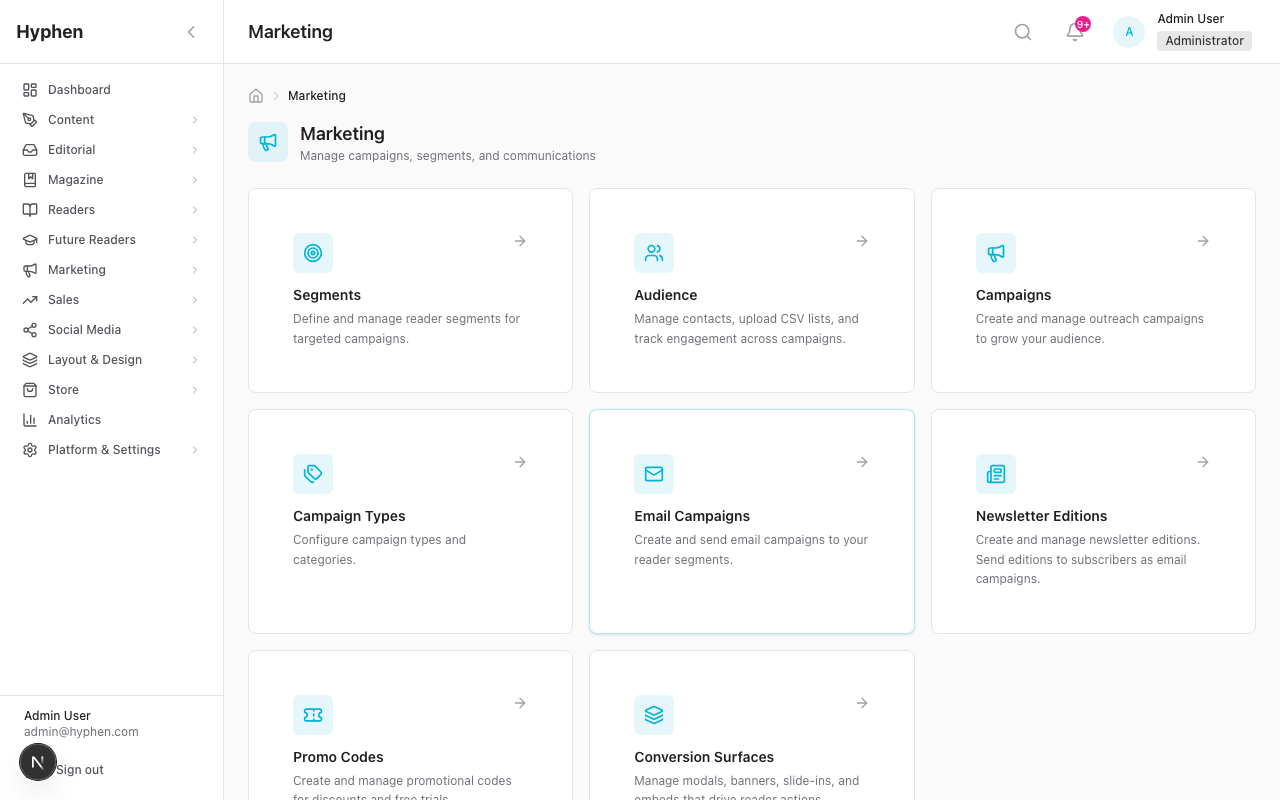
The Marketing module is the platform's growth engine. It lets you describe an audience once (a Segment), then reuse that audience to send email campaigns, invite people to outreach campaigns, and distribute discount codes — while a separate, always-on layer of conversion surfaces quietly converts anonymous Reader Portal visitors into subscribers. Everything is admin-authored, persisted in PostgreSQL, and delivered through your configured email provider or rendered on the public Reader Portal.
1. Executive Overview
What It Does
The Marketing Features module provides a comprehensive marketing, outreach, and audience engagement system for the Hyphen Publishing Platform. It enables publication administrators to:
- Build and manage audience contact lists from CSV imports, campaign submissions, and newsletter signups
- Create targeted user segments with advanced filtering across both registered readers and external audience contacts
- Launch outreach campaigns with customizable landing pages, dynamic forms, event content, incentives, and social integration
- Send email campaigns to segmented audiences using templated emails with engagement tracking
- Manage newsletter editions authored in Strapi CMS, sent as email campaigns, and archived for readers
- Create and distribute promotional codes with configurable discount types and validity rules
- Deploy conversion surfaces (modals, banners, slide-ins) with targeting rules and trigger-based activation on the Reader Portal
- Track engagement analytics across campaigns, email deliveries, and conversion surfaces with integrated GA4 and internal metrics
Who Uses It
| Role | Access Level |
|---|---|
| Marketing Admin | Full access: create, edit, publish, delete campaigns; manage audience, segments, email campaigns, promo codes, conversion surfaces |
| Editor / Content Manager | Campaign read access; may publish campaigns depending on RBAC |
| Viewer | Read-only access to campaigns and metrics |
| Reader (Public) | Accesses campaign landing pages, newsletter archive, receives emails/notifications |
Business Problem It Solves
Publications need to grow their readership, retain subscribers, and promote events/content. This module provides a unified platform to:
- Acquire new readers through outreach campaigns (student programs, events, lead generation)
- Convert anonymous visitors to subscribers through strategically-placed conversion surfaces
- Engage existing audiences through segmented email campaigns and newsletters
- Track marketing ROI through integrated analytics across all channels
2. Feature Scope
In Scope
| Feature | Status |
|---|---|
| Audience Contact Management (CRUD, CSV import/export) | Implemented |
| User Segment Builder (advanced multi-source filtering) | Implemented |
| Outreach Campaign CRUD (7-step wizard, 5+ campaign types) | Implemented |
| Campaign Landing Pages (reader portal, template-based) | Implemented |
| Campaign Publishing Workflow (draft → active → completed → archived) | Implemented |
| Campaign Submissions & Review (approval/rejection with email) | Implemented |
| Campaign Invitations (segment-targeted email invitations) | Implemented |
| Email Campaigns (template-based, scheduled/immediate send) | Implemented |
| Newsletter Editions (Strapi CMS content, send-as-campaign bridge) | Implemented |
| Promotional Codes (percentage/fixed/trial_days, auto-generation) | Implemented |
| Conversion Surfaces (6 surface types, 7 trigger types, targeting) | Implemented |
| Marketing Inbox hub (Campus Inquiries + Contact Submissions + Feedback Submissions) | Implemented |
| Campaign Types (admin-manageable, seeded from enum) | Implemented |
| Social Media Integration (social post creation from campaigns) | Implemented |
| QR Code Generation (for campaign landing pages) | Implemented |
| Campaign Statistics & Analytics | Implemented |
| Email Engagement Webhooks (SendGrid, Mailchimp) | Implemented |
| Cron-based Automation (scheduled emails, campaign lifecycle, invitations) | Implemented |
Out of Scope
- A/B testing for conversion surfaces (planned for future)
- Geographic targeting for conversion surfaces (planned)
- Webhook events for campaign lifecycle (planned)
- Content-aware inline embed positioning (planned)
- Admin preview mode for conversion surfaces (planned)
Related Modules / Dependencies
| Module | Dependency Type |
|---|---|
| User & Subscription Management (04) | Segments query Reader and Subscription models; promo codes create subscriptions |
| Admin Settings & RBAC (11) | All marketing endpoints enforce permission-based access control |
| Notifications & Email System (14) | Email campaigns use shared email service (SendGrid/SMTP); webhooks update delivery metrics |
| Reader Portal (13) | Campaign landing pages, newsletter archive, conversion surfaces render here |
| Social Media Management (08) | Campaigns link to SocialCampaign for cross-channel posting |
| Homepage Layout & Templates (03) | Campaign pages extend the page template system (DynamicTemplate, SectionRenderer) |
| E-Commerce / Shopify (09) | Conversion surfaces can link to products |
| Strapi CMS | Newsletter editions are authored and stored in Strapi |
3. Roles & Permissions
Marketing Permissions
| Permission Key | Description | Required For |
|---|---|---|
MARKETING_SEGMENTS_READ | View segments | Segments list, segment detail |
MARKETING_SEGMENTS_CREATE | Create segments | New segment |
MARKETING_SEGMENTS_UPDATE | Edit segments | Edit segment filters |
MARKETING_SEGMENTS_DELETE | Delete segments | Remove unused segments |
MARKETING_CAMPAIGNS_READ | View campaigns, audience, promo codes | Campaign list, detail, audience list |
MARKETING_CAMPAIGNS_CREATE | Create outreach campaigns | New campaign wizard |
MARKETING_CAMPAIGNS_UPDATE | Edit campaigns, publish/unpublish | Edit campaign, status transitions |
MARKETING_CAMPAIGNS_DELETE | Delete campaigns | Remove campaigns |
MARKETING_SUBMISSIONS_READ | View submissions | Submissions tab |
MARKETING_SUBMISSIONS_REVIEW | Approve/reject submissions | Submission approval workflow |
MARKETING_SUBMISSIONS_EXPORT | Export submission data | CSV export |
MARKETING_EMAIL_CAMPAIGNS_READ | View email campaigns | Email campaign list |
MARKETING_EMAIL_CAMPAIGNS_CREATE | Create email campaigns | New email campaign |
MARKETING_EMAIL_CAMPAIGNS_UPDATE | Edit email campaigns | Edit draft campaigns |
MARKETING_EMAIL_CAMPAIGNS_DELETE | Delete email campaigns | Remove unsent campaigns |
MARKETING_EMAIL_CAMPAIGNS_SEND | Send/schedule email campaigns | Send action |
MARKETING_CAMPUS_INQUIRIES_READ / _UPDATE | View / triage campus-visit inquiries | Inbox → Campus Inquiries panel |
MARKETING_CONTACT_SUBMISSIONS_READ / _UPDATE | View / triage Contact-Us messages | Inbox → Contact Submissions panel |
MARKETING_FEEDBACK_SUBMISSIONS_READ / _UPDATE | View / triage reader feedback | Inbox → Feedback Submissions panel |
Inbox access is per-panel. The Inbox nav entry appears if a user holds any of the three
READpermissions. Inside the hub, each panel is gated independently — a user with onlyMARKETING_FEEDBACK_SUBMISSIONS_READsees the Feedback panel and an "Access Restricted" message on the others. The threeREAD/UPDATEpairs are granted to the editor, sales_manager, and marketing_manager roles by default.
Additional Related Permissions
| Permission Key | Used By |
|---|---|
SETTINGS_READ | View email templates and preferences |
SETTINGS_UPDATE | Create/edit email templates and preferences |
RBAC Configuration
Permissions are assigned to roles in Admin Console → Settings → Roles & Permissions. Each role can be granted specific marketing permissions. The Marketing Hub page itself controls card visibility based on permissions — users without MARKETING_CAMPAIGNS_READ will not see the Campaigns card.
4. Architecture & Design Overview
System Architecture
┌─────────────────────────────────────────────────────────────────┐
│                        ADMIN CONSOLE                            │
│  ┌──────────┐ ┌──────────────┐ ┌────────────┐ ┌─────────────┐ │
│  │ Marketing│ │  Email       │ │  Segments  │ │  Conversion │ │
│  │ Hub      │ │  Campaigns   │ │  Builder   │ │  Surfaces   │ │
│  └────┬─────┘ └──────┬───────┘ └─────┬──────┘ └──────┬──────┘ │
│       │              │               │               │         │
│  ┌────┴──────────────┴───────────────┴───────────────┴──────┐  │
│  │              /api/marketing/*  (REST APIs)               │  │
│  └────┬──────────────┬───────────────┬───────────────┬──────┘  │
│       │              │               │               │         │
│  ┌────┴──────────────┴───────────────┴───────────────┴──────┐  │
│  │                  Prisma ORM (PostgreSQL)                  │  │
│  │  OutreachCampaign | EmailCampaign | UserSegment |        │  │
│  │  AudienceContact | ConversionSurface | etc.              │  │
│  └──────────────────────────────────────────────────────────┘  │
│       │                                                        │
│  ┌────┴────┐  ┌───────────┐  ┌──────────────┐                │
│  │ Strapi  │  │ SendGrid/ │  │  S3 Storage  │                │
│  │  CMS    │  │  SMTP     │  │  (uploads)   │                │
│  └─────────┘  └───────────┘  └──────────────┘                │
└─────────────────────────────────────────────────────────────────┘
         │                         │
         ▼                         ▼
┌─────────────────────────────────────────────────────────────────┐
│                       READER PORTAL                             │
│  ┌──────────────┐  ┌──────────────┐  ┌───────────────────────┐ │
│  │  Campaign    │  │  Newsletter  │  │  Conversion Surface   │ │
│  │  Landing     │  │  Archive     │  │  Renderer (global)    │ │
│  │  Pages       │  │  Pages       │  │  Modals/Banners/etc.  │ │
│  └──────────────┘  └──────────────┘  └───────────────────────┘ │
└─────────────────────────────────────────────────────────────────┘
Key Entities & Models
| Model | Purpose | Storage |
|---|---|---|
OutreachCampaign | Outreach campaigns with landing page config, form fields, event details | Prisma |
CampaignSubmission | Form submissions from campaign landing pages | Prisma |
CampaignInvitation | Email invitations sent to segments for campaigns | Prisma |
CampaignType | Admin-manageable campaign type definitions | Prisma |
CampaignNotifyRequest | "Notify me" requests from expired campaign visitors | Prisma |
UserSegment | Audience segment with JSON filter criteria | Prisma |
AudienceContact | External contacts imported via CSV or created from submissions | Prisma |
EmailCampaign | Email campaigns with template, segment targeting, delivery metrics | Prisma |
EmailTemplate | Reusable email templates with Handlebars variable support | Prisma |
PromotionalCode | Auto-generated promo codes linked to campaigns | Prisma |
DiscountCoupon | Admin-created reusable discount codes | Prisma |
ConversionSurface | Promotional surfaces (modals, banners) with targeting/trigger config | Prisma |
ConversionEvent | Interaction events (impression, click, dismiss, conversion) | Prisma |
NewsletterEdition | Newsletter content editions | Prisma (local mirror) + Strapi (authoring) |
Workflow / State Models
Outreach Campaign Status Flow:
draft ──publish──→ active ──unpublish──→ paused ──publish──→ active
                     │                      │
                  complete               archive
                     │                      │
                     ▼                      ▼
                 completed ──archive──→ archived
Email Campaign Status Flow:
draft ──schedule──→ scheduled ──cron trigger──→ sending ──→ sent
  │                                                  │
  └──send now──→ sending ──────────────────────→ sent/failed
Campaign Submission Status Flow:
pending_review ──approve──→ approved
       │                        │
       ├──reject───→ rejected   └──generate promo──→ (with PromotionalCode)
       │
       └──request info──→ needs_info ──resubmit──→ pending_review
Conversion Surface Status Flow:
draft ──activate──→ active ──pause──→ paused ──activate──→ active
  │                   │                  │
  └──schedule──→ scheduled             archive
                  │                      │
                  └──cron──→ active      ▼
                      │              archived
                   expires
                      │
                      ▼
                   expired
How It Works (Behind the Scenes)
Every marketing feature follows the same end-to-end shape: an admin authors something in the Admin Console UI, the browser calls a REST endpoint under /api/marketing/*, the handler enforces RBAC and writes to PostgreSQL via Prisma, and the result is then either delivered as email or rendered on the Reader Portal. Newsletters add one extra hop — content is authored in Strapi and bridged into a Prisma EmailCampaign at send time.
Reading the diagram:
- Authoring happens entirely in the Admin Console. No marketing object is created directly in the database.
- Recipient resolution is centralized in
resolveSegmentRecipients()— both the manual Send action and the scheduled-email cron call it, so a segment that mixes registered readers and audience contacts always resolves identically (deduped by email, opt-in enforced, unsubscribed/banned/anonymised addresses excluded). - Delivery feedback (opens, clicks, bounces, unsubscribes) returns from the provider via webhook and is written back onto the campaign/invitation record — the same row that triggered the send.
- Reader-facing surfaces (campaign landing pages, the newsletter archive, conversion overlays) read published data from the database; the Reader Portal never writes marketing config, only events (submissions, conversion interactions).
Concepts: Segments, Campaigns & Coupons
Four concepts underpin the whole module. Understanding how each is evaluated — not just configured — is the key to predictable campaigns.
Audience segmentation — how segments are evaluated & previewed
A Segment (user_segments table) is not a saved list of people. It is a saved set of filter rules stored as a JSON filters object. Members are resolved dynamically at query time every time you preview, count, send, or export — so a segment automatically grows or shrinks as readers and contacts change.
- Two source tables, one result. Depending on the Contact Source filter, a segment queries the
Readertable, theAudienceContacttable, or both, then de-duplicates by email (case-insensitive). - Filter logic. Rules are combined with AND between filter groups and OR within a group. Example: (Subscription = Active OR Trial) AND (Tag = "students").
- Base guards always apply. Reader resolution unconditionally starts from
{ isActive: true, isBanned: false }— GDPR-anonymised and banned readers are never returned, even before your filters run. Audience contacts must haveisActive: true. - Live preview. As you edit filters, the right sidebar fires a debounced count (
POST /api/marketing/segments/preview) so you see the audience size before saving. Preview Members returns a sample (up to ~20) labelled by source. The storedmemberCount+lastCountedAtcache the most recent count for fast list display.
Campaign types & lifecycle
There are two distinct things called "campaign" — keep them separate:
| Outreach Campaign | Email Campaign | |
|---|---|---|
| Model | OutreachCampaign | EmailCampaign |
| Output | A public Reader Portal landing page with a form | A batch of emails to a segment |
| Lifecycle | draft → active → paused / completed → archived | draft → scheduled → sending → accepted → sent (or failed) |
| Drives | Sign-ups, event registration, lead capture | Newsletters, announcements, re-engagement |
- Outreach campaign lifecycle is a strict state machine driven by the Publish endpoint (publishing validates name, slug, dates, and at least one form field). The landing page renders differently per status and, for event-type campaigns, per timing (Upcoming / Happening Now / Recap). See Sections 8–9.
- Email campaign lifecycle adds an honest intermediate
acceptedstate: the provider returned 2xx but inbox delivery isn't yet confirmed; the row only flips tosent("Delivered" in the UI) once the delivery webhook confirms arrival. Thedeliveredcounter is an evolving number that keeps rising for ~22 minutes post-send as transient failures are retried. - Campaign types (
CampaignTypetable) are admin-managed categories. The type is a free-form slug — admins can create custom types (e.g. "Festival Campaign") and optionally pin them to a reader-portal template viatemplateMappingHint.
Promo codes & coupons
Discounts come from two models with different lifecycles:
Admin Coupon (DiscountCoupon) | Campaign Code (PromotionalCode) | |
|---|---|---|
| Created | Manually in Marketing → Promo Codes | Auto-generated on approving a campaign submission |
| Reuse | Reusable (maxUses, maxUsesPerUser) | Single-use (maxRedemptions = 1) |
| Example | WELCOME20 | FEST-7K2P9 |
| Linked to | A plan / interval (optional) | One submission |
Both are checked by the public validate/redeem endpoints. Validation (POST /api/promo/validate, 20 req/min/IP) confirms the code exists, is active, not expired, and under its usage limit. Redemption (POST /api/promo/redeem, 5 req/15 min/IP) atomically claims a slot; for trial_days codes it also creates the reader account + subscription in one transaction.
Forms & submissions
Outreach campaigns carry an admin-built form (the formFields JSON). When a visitor submits on the landing page, the platform creates a CampaignSubmission, upserts an AudienceContact from the form data (so the lead re-enters your segment pool), and routes the row into the approval workflow (pending_review → approved / rejected / needs_info). Approving a submission can auto-generate a promo code and trigger an email. See Sections 8 and 10.
Configuration Reference
Field-by-field reference for the main marketing objects. Where configured is the Admin Console UI path unless it says env (backend environment variable). Roles refer to the permission keys in Section 3.
Segment rules (user_segments)
| Field / Option | What it does | Type | Mandatory? | Default | Where configured | Role |
|---|---|---|---|---|---|---|
| Name | Segment label | string | Yes | — | Marketing → Segments → New | MARKETING_SEGMENTS_CREATE |
| Description | Internal note | string | No | — | Segments → New | MARKETING_SEGMENTS_UPDATE |
| Contact Source | Readers / Audience Contacts / All | enum | No | All | Segment builder | — |
| Subscription Status | Active / Expired / Cancelled / Trial | multi | No | — | Segment builder | — |
| User Tier | Free / Basic / Premium … | multi | No | — | Segment builder | — |
| Audience Tags | Tags on audience contacts | multi | No | — | Segment builder | — |
| Newsletter Opt-In | Subscribed / Not | enum | No | — | Segment builder | — |
| Registration / Last-Active Date | Date-range filters | range | No | — | Segment builder | — |
filters (JSON) | Persisted rule set; AND across groups, OR within | json | auto | {} | Backend (written by UI) | — |
memberCount / lastCountedAt | Cached size + refresh time | int / date | auto | 0 | Backend | — |
Segments do not expose account-status filtering: every segment targets only active, non-banned readers by design.
Outreach campaign fields (outreach_campaigns)
| Field / Option | What it does | Type | Mandatory? | Default | Where configured | Role |
|---|---|---|---|---|---|---|
| Name | Campaign name | string | Yes | — | New Campaign → Basics | MARKETING_CAMPAIGNS_CREATE |
| Slug | Unique public URL segment | string | Yes | from name | Basics | — |
Type / campaignTypeId | Category (drives template) | slug / FK | No | general | Basics | — |
| Start / End Date | Lifecycle + landing-page state | date | Yes | — | Basics | — |
eventTime | Display time on hero | string | No | — | Basics | — |
formFields | The landing-page form (≥1 required to publish) | json | Yes | — | Form Fields step | — |
enabledSections | Which landing sections render & order | json | No | type preset | Sections step | — |
| Landing title / subtitle / content / hero | Page presentation | string / html | No | — | Landing Page step | — |
| Incentive type / value | none / free_trial / percentage_discount / fixed_discount | enum / num | No | none | Incentive step | — |
promoCodePrefix / promoValidityDays | Auto-generated code shape | string / int | No | — | Incentive step | — |
| Status | Lifecycle state | enum | auto | draft | Publish action only | MARKETING_CAMPAIGNS_UPDATE |
Email campaign fields (email_campaigns)
| Field / Option | What it does | Type | Mandatory? | Default | Where configured | Role |
|---|---|---|---|---|---|---|
| Name | Internal name | string | Yes | — | New Email Campaign | MARKETING_EMAIL_CAMPAIGNS_CREATE |
| Subject | Email subject (supports {{vars}}) | string | Yes | — | Editor | — |
templateId / customHtml | Template OR raw HTML body | FK / html | One of | — | Editor | — |
segmentId | Target audience | FK | Yes (to send) | — | Editor | — |
scheduledAt | Future send time | date | No | — | Schedule action | MARKETING_EMAIL_CAMPAIGNS_SEND |
forceSend | Bypass newsletter opt-in check | bool | No | false | Send dialog | MARKETING_EMAIL_CAMPAIGNS_SEND |
newsletterEditionId | Links campaign to a newsletter | FK | auto | — | Newsletter "Send as Campaign" | — |
| Metrics (delivered/opened/clicked/bounced/unsubscribed) | Engagement counters | int | auto | 0 | Backend (webhooks) | — |
Coupon fields (discount_coupons)
| Field / Option | What it does | Type | Mandatory? | Default | Where configured | Role |
|---|---|---|---|---|---|---|
code | Unique redeemable code | string | Yes | — | Promo Codes → New | MARKETING_PROMO_CODES_CREATE |
discountPercent / discountAmount | Percentage OR fixed (paise) | int | One of | — | New code | — |
planId / billingInterval | Restrict to plan / interval | FK / enum | No | all | New code | — |
maxUses / maxUsesPerUser | Total + per-reader limits | int | No | 1 / 1 | New code | — |
validFrom / validTo | Validity window | date | No | now / none | New code | — |
newSubscribersOnly | First-time subscribers only | bool | No | false | New code | — |
appliesTo / discountCycles | FIRST_PAYMENT / N_CYCLES / ALL_RENEWALS | enum / int | No | FIRST_PAYMENT | New code | — |
allowGift / allowBulk / allowInstitutional | Eligible subscription types | bool | No | false | New code | — |
Campaign form fields (formFields entries) & QR
| Field / Option | What it does | Type | Mandatory? | Default | Where configured | Role |
|---|---|---|---|---|---|---|
type | text/email/phone/url/number/date/textarea/select/radio/checkbox/photo_selfie/photo_id_card/file_upload/institution_picker | enum | Yes | text | Form Fields step | MARKETING_CAMPAIGNS_UPDATE |
label / placeholder / helpText | Field presentation | string | label Yes | — | Form Fields step | — |
required | Enforce a value | bool | No | false | Form Fields step | — |
Validation (minLength/maxLength/min/max/pattern) | Input rules | mixed | No | — | Form Fields step | — |
options | Choices for select/radio/checkbox | list | for those types | — | Form Fields step | — |
| QR code | PNG linking to landing page | image | auto | — | Campaign → QR Code tab (download) | MARKETING_CAMPAIGNS_READ |
Key backend / environment settings
| Setting | What it does | Where | Mandatory? |
|---|---|---|---|
SENDGRID_API_KEY or SMTP_HOST/PORT/USER/PASS | Email delivery | env (Admin) | Yes (one) |
EMAIL_FROM_ADDRESS / EMAIL_FROM_NAME | Sender identity | env (Admin) | Yes |
CRON_SECRET | Authorizes scheduled sends & lifecycle crons | env (Admin) | Yes |
STRAPI_URL / STRAPI_API_TOKEN | Newsletter authoring | env (Admin) | Newsletters only |
AWS_S3_BUCKET / AWS_ACCESS_KEY_ID / AWS_SECRET_ACCESS_KEY / AWS_REGION | Form file uploads | env (Admin) | File-upload forms |
NEXT_PUBLIC_READER_URL | Preview & public campaign links | env (Admin) | Yes |
NEXT_PUBLIC_ADMIN_API_URL | Reader fetches campaign data | env (Reader) | Yes |
NEXT_PUBLIC_GA_MEASUREMENT_ID | GA4 surface/newsletter analytics | env (Reader) | Optional |
SENDGRID_WEBHOOK_VERIFICATION_KEY / MAILCHIMP_WEBHOOK_KEY | Webhook signature verification | env (Admin) | Optional |
Dependencies & Impact
Marketing is highly interconnected — most features fail silently or partially if an upstream dependency is missing, so review this before going live.
| Depends on / Impacts | Why it matters |
|---|---|
| Conversion Surfaces | Conversion overlays (modals, banners, slide-ins) are authored in Marketing but render and convert on the Reader Portal. That surface has its own deep guide — this page only summarizes it (Section 15). |
| Marketing Operations | Day-to-day operational runbooks: cron scheduling, send monitoring, deliverability, and incident response for stuck or failed sends. |
| Email System | All campaigns, invitations, and submission notifications ship through the shared email service. Without a verified provider and a primary account mapped to the marketing_campaign / newsletter purposes, every send fails. Branding, footers, and unsubscribe handling are configured there. |
| Subscriptions | Segments query subscription tier/status; coupons restrict to plans and create subscriptions on redemption; trial_days codes create reader accounts. Plan and billing-interval changes propagate into coupon behaviour. |
| Analytics | Email engagement (opens/clicks/bounces) and conversion-surface events feed both internal counters and GA4. Campaign statistics are computed from live submission/event data. |
Impact when a dependency is broken:
- No email provider → email campaigns hang in
sending, invitations and approval/rejection emails never arrive. - Cron not running → scheduled emails, scheduled invitations, and campaign auto-completion never fire.
- Strapi down → newsletter editions cannot be authored or published (other features unaffected).
- S3 unconfigured → campaign forms with photo/file fields reject uploads.
- RBAC misconfigured → the relevant Marketing Hub cards and actions are hidden for the role.
5. Prerequisites & Setup Requirements
Critical Prerequisites (Must be configured before marketing features work)
1. Email Provider Configuration
Marketing relies heavily on email delivery. Without a configured email provider, email campaigns, invitations, and submission notifications will fail.
| Setting | Location | Required |
|---|---|---|
SENDGRID_API_KEY | Environment variable | Yes (if using SendGrid) |
SMTP_HOST, SMTP_PORT, SMTP_USER, SMTP_PASS | Environment variable | Yes (if using SMTP) |
EMAIL_FROM_ADDRESS | Environment variable | Yes |
EMAIL_FROM_NAME | Environment variable | Yes |
Verify: Admin Console → Settings → Email → Accounts → click an account → Verify connection. A successful probe returns latency in ms; a failure returns the provider's actual error message. Also confirm at Settings → Email → Purposes that marketing_campaign and newsletter have a primary account. See the Email System Guide.
2. Email Templates
Campaign-related emails (approval, rejection, invitation, notification) require email templates to be seeded.
Action: Seed default templates by calling POST /api/marketing/email-templates/seed or creating them manually in Admin Console → Settings → Email → Templates. Each template should also carry a defaultPurposeKey (set on the editor's Email purpose dropdown) so the right account ships it.
Required template keys:
campaign_submission_approvedcampaign_submission_rejectedcampaign_invitationcampaign_notify_new_campaign
3. Email Preferences & Branding
Configure email branding (logo, colors, publication name, footer, unsubscribe link) in Admin Console → Settings → Email → Templates → Preferences to ensure all outgoing emails look professional and comply with CAN-SPAM requirements.
4. Strapi CMS Configuration (for Newsletters only)
Newsletter editions are authored in Strapi. Required settings:
| Setting | Location | Required For |
|---|---|---|
STRAPI_URL | Environment variable | Newsletter CRUD |
STRAPI_API_TOKEN | Environment variable | Newsletter CRUD |
Newsletter editions content type must exist in Strapi with fields: title, slug, previewText, content, plainTextContent, editionNumber, topic, publishDate, coverImage, status, isFeatured, priority.
5. S3 Storage Configuration (for file uploads)
Campaign form submissions may include file uploads (selfies, ID cards, documents).
| Setting | Location | Required For |
|---|---|---|
AWS_S3_BUCKET | Environment variable | Campaign file uploads |
AWS_ACCESS_KEY_ID | Environment variable | Campaign file uploads |
AWS_SECRET_ACCESS_KEY | Environment variable | Campaign file uploads |
AWS_REGION | Environment variable | Campaign file uploads |
6. Cron Job Configuration
Automated tasks require the cron system to be running.
| Cron Endpoint | Purpose | Recommended Interval |
|---|---|---|
GET /api/cron/send-scheduled-emails | Send due email campaigns | Every 1-5 minutes |
GET /api/cron/campaign-status | Auto-complete expired campaigns, send notifications | Every 15-30 minutes |
GET /api/cron/send-invitations | Send scheduled invitations | Every 5 minutes |
GET /api/cron/expire-invitations | Expire overdue invitations | Every hour |
GET /api/cron/invitation-reminders | Send weekly invitation reminders | Weekly |
All cron endpoints require: Authorization: Bearer <CRON_SECRET>
7. Webhook Configuration (for email engagement tracking)
To track email opens, clicks, bounces, and unsubscribes:
SendGrid:
- Register webhook URL:
{ADMIN_CONSOLE_URL}/api/webhooks/sendgrid - In SendGrid Dashboard → Settings → Mail Settings → Event Webhook
- Optional: Set
SENDGRID_WEBHOOK_VERIFICATION_KEYfor signature verification
Mailchimp/Mandrill:
- Register webhook URL:
{ADMIN_CONSOLE_URL}/api/webhooks/mailchimp - In Mandrill Dashboard → Settings → Webhooks
- Optional: Set
MAILCHIMP_WEBHOOK_KEYfor HMAC-SHA1 verification
8. Reader Portal URL Configuration
Campaign landing pages render on the Reader Portal. The Admin Console needs to know the Reader Portal URL for preview links and public campaign URLs.
| Setting | Location |
|---|---|
NEXT_PUBLIC_READER_URL | Admin Console environment variable |
NEXT_PUBLIC_ADMIN_API_URL | Reader Portal environment variable (to fetch campaign data from Admin API) |
9. RBAC Permission Assignment
Ensure the appropriate roles have marketing permissions assigned. Navigate to Admin Console → Settings → Roles & Permissions and grant the marketing permission group to roles that need access.
10. GA4 Configuration (for conversion surface analytics)
Conversion surfaces fire custom GA4 events. If you use Google Analytics:
| Setting | Location |
|---|---|
NEXT_PUBLIC_GA_MEASUREMENT_ID | Reader Portal environment variable |
GA4 events tracked: conversion_surface_impression, conversion_surface_click, conversion_surface_dismiss, conversion_surface_conversion, coupon_copied, newsletter_signup, registration_start.
5A. Sub-Module: Marketing Inbox (Triage Hub)
The Marketing Inbox consolidates three reader-originated message streams behind one nav entry: Campus Inquiries, Contact Submissions, and Feedback Submissions. Inbox is the single entry point for these streams.
Purpose
Give the marketing/editorial team one place to read and triage everything readers send in (as opposed to campaigns the team sends out): campus-visit requests, Contact-Us messages, and portal feedback.
Access
Admin Console → Marketing → Inbox
The page is a two-panel hub (same pattern as the Content Hub): a left sidebar lists the available streams and the right pane renders the selected panel. The active stream is held in the URL as ?type= (campus-inquiries, contact-submissions, or feedback-submissions), so a panel is shareable/bookmarkable. The default stream is Campus Inquiries.
The Three Streams
| Stream | What feeds it | Source surface | Statuses |
|---|---|---|---|
| Campus Inquiries | Campus-visit invite requests | Student-outreach landing page | new, contacted, scheduled, completed, declined |
| Contact Submissions | General messages | Reader-Portal Contact Us form | new, read, responded, archived |
| Feedback Submissions | Ratings, bug reports, suggestions | Reader-Portal feedback form (POST /api/public/feedback) | new, read, responded, archived |
Each panel has status tabs with live counts, a table view, and a detail modal. Opening a new item auto-marks it read (requires the stream's _UPDATE permission). The detail modal lets you change status, record internal notes, and (feedback) assign the item to a team member.
Feedback Submissions (detail)
- The public form persists straight to a dedicated
FeedbackSubmissiontable — anonymous submissions (no name/email) are accepted, and the route is rate-limited to 20 submissions per hour per IP. Nothing is routed through the email service, so feedback is never lost to a delivery failure. - Each row carries: optional name/email, a 1–5 star rating, a category (general, bug, suggestion, content, other), the message, and the
pageUrlthe reader was on when they submitted. - Triage actions (
PATCH /api/marketing/feedback-submissions/[id]) are audit-logged (feedback_submission.update).
Business Rules
- The Inbox nav link is visible if the user holds any of the three
READpermissions; individual panels are gated by their ownREADpermission. - Status changes, notes, and assignment require the matching
_UPDATEpermission. - No campaign, segment, or email-provider configuration is required for the Inbox to work — these streams are independent of the outbound stack.
6. Sub-Module: Audience Contacts
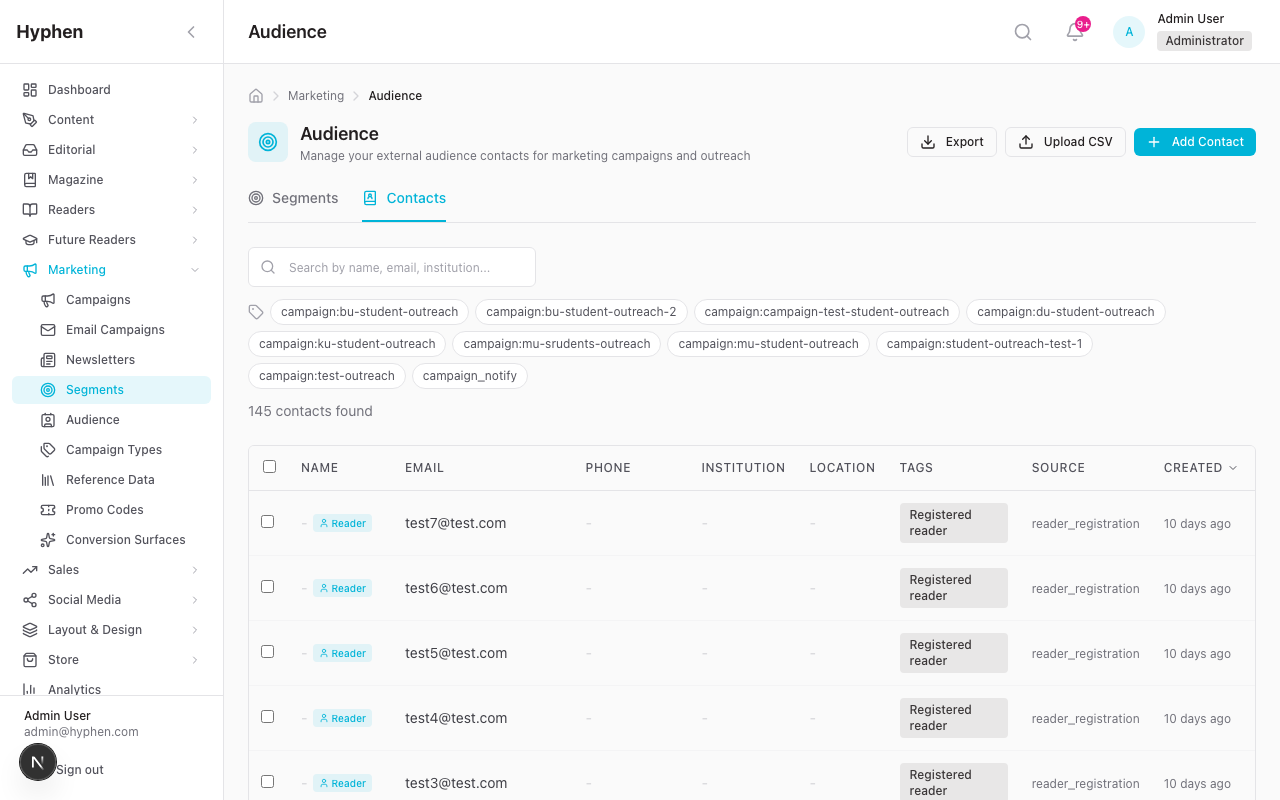
Purpose
Manage external audience contacts (people not yet registered as readers) for use in segments, campaign invitations, and email campaigns.
Access
Admin Console → Marketing → Segments → Contacts tab (Also accessible via Marketing → Audience, which redirects to the Contacts tab)
Key Features
6.1 View Contacts
- Table view with columns: Name, Email, Phone, Institution, Tags, Source, Created
- Search by name or email
- Filter by tags
- Sort by any column
- Pagination
6.2 Add Single Contact
- Click "Add Contact" button
- Fill in fields: Email (required), Name, Phone, Institution, Designation, City, State, Country, Tags
- Click Save
- Contact is created with
source: 'manual'
6.3 Bulk Import via CSV
- Click "Upload CSV" button
- Drag-and-drop or browse to select a CSV file
- Column Mapping Step: The system auto-detects columns. Map CSV columns to contact fields (email, name, phone, institution, etc.)
- Preview Step: Review first 5 rows of mapped data
- Click Upload
- System upserts contacts by email (creates new, updates existing)
- Results summary shows: created, updated, skipped, errors
CSV Requirements:
- Must have an
emailcolumn (required) - All other columns are optional
- Duplicate emails are updated (not duplicated)
- Tags can be specified as comma-separated values
6.4 Edit Contact
- Click any contact row to open the Edit Contact modal
- Modify fields and click Save
6.5 Delete Contact
- Select one or more contacts → click Delete in bulk actions
- Or click delete icon on individual row
- Soft delete by default (
isActive = false) - Hard delete available with
?hard=truequery parameter (API only)
6.6 Export Contacts
- Click Export to download all active contacts as CSV
6.7 Auto-Created Contacts
Contacts are automatically created (upserted) from:
- Campaign form submissions: Tagged
campaign_submission, with source detail of campaign name - Newsletter signups: Tagged
newsletter_signup
These auto-created contacts appear in the Contacts tab and can be included in segments.
Business Rules
- Email must be unique across all contacts
- Contacts with
isActive = falseare excluded from segments and email sends - Unsubscribed contacts (
unsubscribedAtset) are excluded from non-forced email sends - A contact can be linked to a Reader record via
readerId(one-to-one)
7. Sub-Module: User Segments
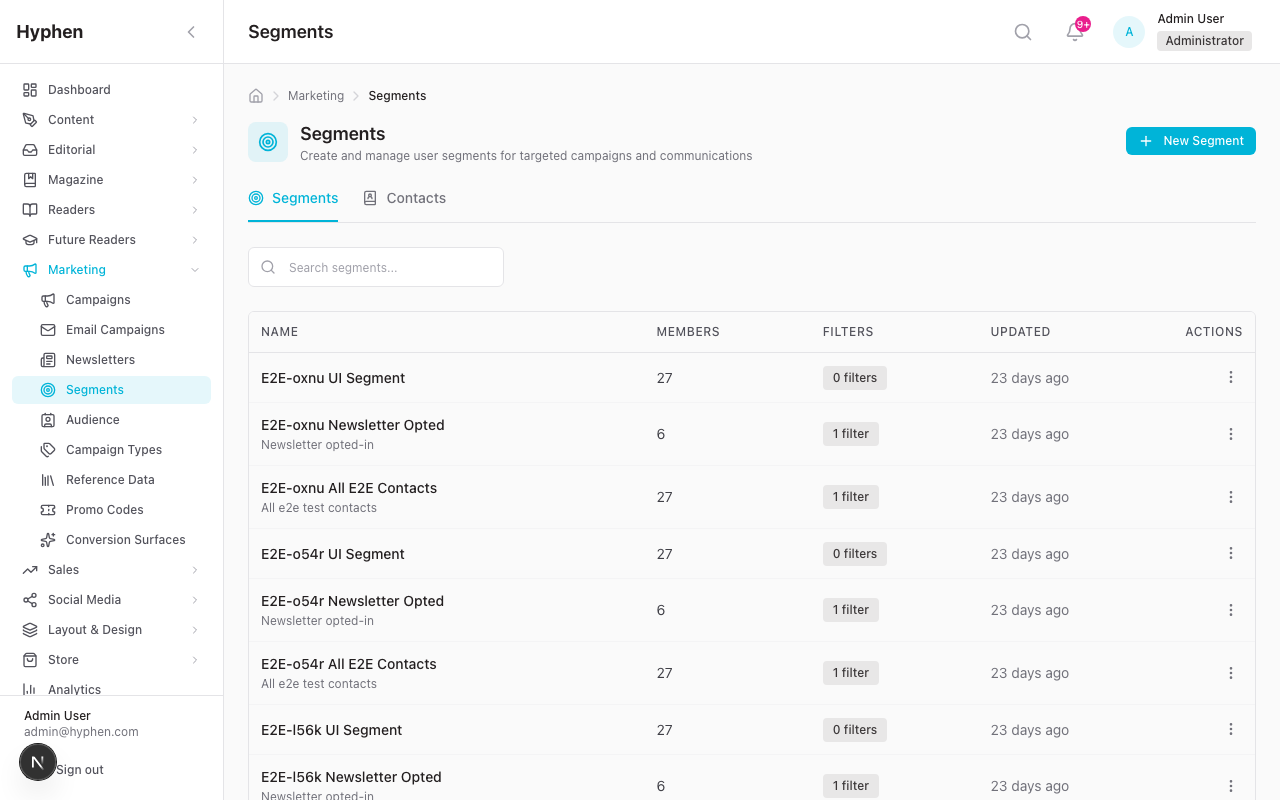
Purpose
Create targeted audience groups by combining filter criteria across both registered readers and audience contacts. Segments are used for email campaigns and campaign invitations.
Access
Admin Console → Marketing → Segments → Segments tab
Key Features
7.1 View Segments
- List view with columns: Name, Member Count, Filters (summarized), Created By, Last Counted
- Search by segment name
- Click any segment to view/edit
7.2 Create Segment
- Click "New Segment"
- Enter segment Name and optional Description
- Build Filters using the sidebar filter groups:
| Filter Group | Filter Options |
|---|---|
| Contact Source | Readers, Audience Contacts, All |
| Campaign | Participated in specific campaign |
| User Tier | Free, Basic, Premium, etc. |
| Account Status | Active, Inactive, Banned |
| Subscription Status | Active, Expired, Cancelled, Trial |
| Email Verified | Yes / No |
| Newsletter Opt-In | Subscribed / Not subscribed |
| Audience Tags | Tags assigned to audience contacts |
| Registration Date | Date range filter |
| Last Active Date | Date range filter |
- Filters use AND logic between groups and OR logic within a group
- The right sidebar shows a live member count (debounced, updates as you change filters)
- Click "Preview Members" to see a sample of matching members
- Click Save Segment
7.3 Edit Segment
- Open segment → modify filters → member count updates in real-time → Save
7.4 Preview Members
- Click "Preview Members" or open the segment → see paginated list of matching members
- Shows both readers and audience contacts with source labels
- Can exclude specific members from the segment preview
7.5 Export Segment
- "Export" downloads segment members as CSV
- Includes both readers and audience contacts with a
sourcecolumn
7.6 Delete Segment
- Only allowed if the segment is not used by active campaigns or invitations
- Attempting to delete a segment in use shows an error message
Business Rules
- Segment member count is auto-calculated when filters change
- Segments resolve members dynamically at query time (not static lists)
- When Contact Source includes "Audience Contacts" or "All", the segment queries both
ReaderandAudienceContacttables - The
lastCountedAttimestamp tracks when the member count was last refreshed - Segment filter criteria are stored as a JSON object on the
UserSegmentmodel
8. Sub-Module: Outreach Campaigns
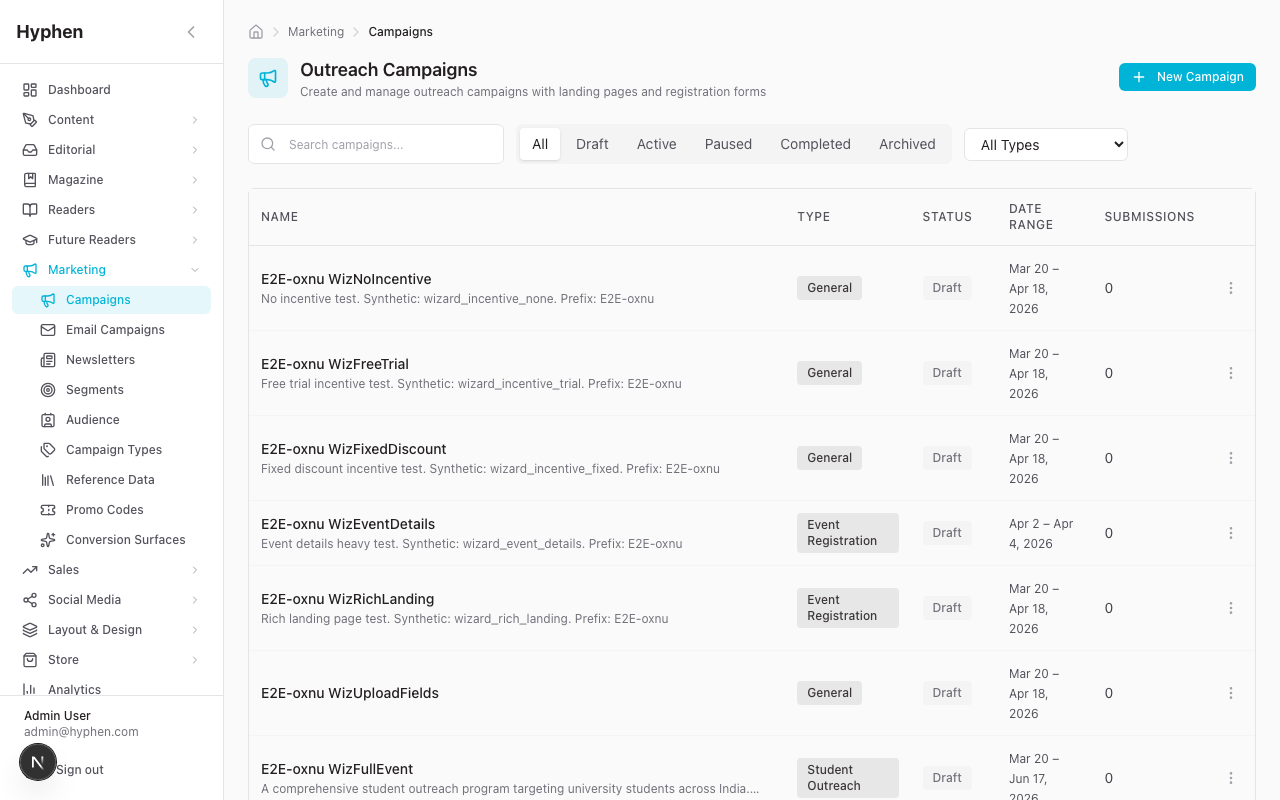
Purpose
Create multi-purpose outreach campaigns with customizable landing pages, dynamic forms, incentives, event content, and post-event materials.
Access
Admin Console → Marketing → Campaigns
Campaign Types
| Type | Use Case |
|---|---|
student_outreach | Student recruitment programs (with institution verification) |
event | Conference, webinar, workshop registration (with rich event content) |
lead_gen | Lead generation with form capture |
institutional | Institutional partnership campaigns |
general | General-purpose outreach |
Additionally, admins can create custom campaign types via the Campaign Types management page.
8.1 Create Campaign (7-Step Wizard)
Navigate to Marketing → Campaigns → New Campaign
Step 1: Basics
- Campaign Name (required)
- URL Slug (required, unique, auto-generated from name)
- Campaign Type (select from admin-managed types)
- Description
- Start Date (required)
- End Date (required)
Step 2: Form Fields Build the campaign registration form using the form field builder:
- Add fields with types: text, email, phone, url, number, date, textarea, select, radio, checkbox, photo_selfie, photo_id_card, file_upload, institution_picker
- Configure per field: label, placeholder, required, help text, validation rules (minLength, maxLength, min, max, pattern), options (for select/radio/checkbox)
- Reorder fields via drag-and-drop
- Also configure Notify Form fields (shown on expired campaigns)
Step 3: Landing Page
- Landing Page Title
- Landing Page Subtitle
- Landing Page Content (rich text / HTML)
- Hero Image (via Media Picker)
- Success Title & Message (shown after form submission)
- Expired Title & Message (shown when campaign is past end date)
- Testimonials (add multiple: name, role, location, quote, rating, avatar via Media Picker)
Step 4: Event Details (for event-type campaigns)
- Speakers: Name, Role, Bio, Talk Title, Photo (Media Picker), Social Links (Twitter, LinkedIn, Website)
- Schedule: Multi-day agenda with sessions (time, title, description, speaker dropdown, location, type: keynote/panel/workshop/break/networking)
- Partners: Name, Logo (Media Picker), Tier (title_sponsor/partner/supporter/media_partner), Website
- Why Attend: Benefits list (title, description, icon)
- Venue Info: Name, Address, City, Map URL, Directions
- Live Stream: URL, Type (YouTube/Vimeo/Custom)
Step 5: Post-Event Content (for completed events)
- Gallery: Multiple images via Media Picker with captions
- Winners: Display mode (ranked/flat/categorized), Winner entries (name, award, category, rank, description, photo)
- Recording URL: Link to event recording
- Resources: Downloadable files (title, URL, type, description, thumbnail)
Step 6: Incentive
- Incentive Type: none, free_trial, percentage_discount, fixed_discount
- Incentive Value (e.g., 30 days trial, 20% off)
- Incentive Description
- Promo Code Prefix (for auto-generated codes)
- Promo Validity Days
- Linked Subscription Plan
Step 7: Review
- Comprehensive preview of all configured sections
- Click Create Campaign to save as draft
8.2 Edit Campaign
Navigate to Marketing → Campaigns → [Campaign Name] → Edit
All fields from the creation wizard are editable. Changes are saved immediately on form submission.
Important: Status changes are NOT allowed through the edit form. Use the Publish/Unpublish actions on the campaign detail page.
8.3 Campaign Detail Page (7 Tabs)
Navigate to Marketing → Campaigns → [Campaign Name]
| Tab | Description |
|---|---|
| Details | Campaign info, form fields preview, incentive details, custom messages |
| Submissions | Submission management with approval workflow (see Section 10) |
| Invitations | Email invitation management (see Section 11) |
| Layout & Style | Page template picker and visual editor for campaign landing page |
| QR Code | Auto-generated QR code linking to campaign landing page URL |
| Statistics | Campaign metrics: total submissions, pending/approved/rejected counts, conversion rate |
| Social | Link to social campaign, compose social posts about the campaign |
8.4 Layout & Style Tab
The Layout & Style tab integrates with the platform's page template system:
- Select Template: Choose from available campaign-compatible templates
- Configure Sections: Customize the order and content of campaign page sections
- Save Draft: Save template changes without publishing
- Publish: Push template changes live to the reader portal
- Preview: Opens the reader portal campaign page in a new tab for visual review
Note: The preview requires the Reader Portal to be running. If preview shows "Preview Unavailable", verify NEXT_PUBLIC_READER_URL is correctly configured and the Reader Portal is running.
8.5 QR Code Tab
Generates a QR code linking to {READER_URL}/campaigns/{slug}. Can be downloaded for use in physical marketing materials.
8.6 Statistics Tab
Shows real-time campaign metrics:
- Total Submissions
- Pending Review Count
- Approved Count
- Rejected Count
- Conversion Count (submissions that resulted in subscriptions)
- Counts are sourced from actual submission records (not denormalized counters)
9. Sub-Module: Campaign Publishing & Landing Pages
Purpose
Control campaign visibility and manage the lifecycle of campaign landing pages accessible to the public.
Publishing Workflow
Publish a Campaign
- Navigate to the campaign detail page
- Ensure the campaign is in Draft or Paused status
- Click "Publish"
- System validates campaign completeness:
- Name is set
- Slug is set
- Start date and end date are set
- At least one form field is configured
- If validation passes: status changes to Active
- The campaign landing page is now live at
{READER_URL}/campaigns/{slug}
Unpublish a Campaign
- From an Active campaign, click "Unpublish"
- Status changes to Paused
- The landing page shows a "Campaign Paused" message to visitors
Complete a Campaign
- From an Active campaign, click "Complete"
- Status changes to Completed
- The landing page shows an "Event Recap" or expired state with notify form
Archive a Campaign
- From a Completed or Paused campaign, click "Archive"
- Status changes to Archived
- Campaign is hidden from public access
Landing Page URL
Every campaign has a public URL: {READER_URL}/campaigns/{slug}
This URL is displayed prominently on the campaign detail page with a copy button.
Landing Page Behavior by Status
| Campaign Status | Landing Page Behavior |
|---|---|
| Draft | Not accessible (404) |
| Active (before start date) | Shows "Upcoming" state with countdown, notify form |
| Active (within date range) | Full campaign page with form, event content if applicable |
| Active (event-type, during event) | "Happening Now" badge, live stream embed, schedule with "now" indicator |
| Paused | Shows "Campaign Paused" message |
| Completed | Shows event recap: gallery, winners, resources, testimonials, notify form |
| Archived | Not accessible (404) |
Event-Type Campaign: 3-State Rendering
Event-type campaigns have enhanced rendering based on timing:
Upcoming State (before start date): Hero → Why Attend → Info → Countdown → Speakers → Schedule → Venue → Registration Form → Partners → Notify Form
Active State (during event): Hero (with "Happening Now") → Live Stream → Why Attend → Info → Schedule (with "now" indicator) → Speakers → Venue → Form (if capacity) → Partners → Testimonials
Completed State (after end date): Hero (recap) → Info → Gallery → Winners → Testimonials → Resources → Speakers → Partners → Notify Form (for next event)
10. Sub-Module: Campaign Submissions & Review
Purpose
Process and review form submissions from campaign landing pages, including approval workflows and promo code generation.
Access
Campaign Detail → Submissions tab
10.1 View Submissions
- Table view with columns: Submitted At, Submitter Info, Status, Reviewed By, Actions
- Filter by status: All / Pending Review / Approved / Rejected / Needs Info
- Search submissions
- Status count badges on each filter tab
10.2 Review a Submission
- Click on a submission row to expand details
- View all form field responses, uploaded files (selfie, ID card, documents)
- Choose an action:
| Action | Result |
|---|---|
| Approve | Status → approved. Optional: send approval email using campaign_submission_approved template |
| Reject | Status → rejected. Requires rejection reason. Optional: send rejection email with reason |
| Request Info | Status → needs_info. Notifies submitter to provide additional information |
10.3 Generate Promo Code
After approving a submission:
- Click "Generate Promo Code"
- System generates a unique code using the campaign's
promoCodePrefix - Code is linked to the submission (one-to-one)
- Code type, value, and validity are based on campaign incentive settings
- Approval email includes the generated promo code
10.4 Bulk Operations
- Select multiple submissions → Bulk Approve or Bulk Reject
- Requires
MARKETING_SUBMISSIONS_REVIEWpermission
10.5 Submission Data Flow
Reader submits form on landing page
  → POST `/api/marketing/campaigns/public/{slug}/submit`
  → Creates CampaignSubmission record
  → Increments campaign counters (totalSubmissions, pendingCount)
  → Upserts AudienceContact from form data (email, name, phone)
  → Admin reviews in Submissions tab
  → Approve → sends approval email → optionally generates promo code
  → Reject → sends rejection email with reason
11. Sub-Module: Campaign Invitations
Purpose
Send targeted email invitations to segmented audiences to drive campaign participation.
Access
Campaign Detail → Invitations tab
11.1 View Invitations
- List of all invitations for the campaign
- Status badges: Draft / Scheduled / Sending / Sent / Failed
- Delivery metrics per invitation: Recipient Count, Delivered, Opened, Clicked, Registered
11.2 Create Invitation
- Click "New Invitation"
- Select Segment: Choose from existing segments (which include audience contacts)
- View segment member count to confirm audience size
- Write Subject Line: Supports
{{campaign_name}}variable - Compose Email Content: Rich text with variable support:
{{user_name}}— Recipient name{{campaign_name}}— Campaign name (auto-resolved){{campaign_url}}— Landing page URL with UTM parameters{{incentive_description}}— Incentive details
- Preview: See rendered email with sample data
- Choose action:
- Save as Draft — Save without sending
- Send Now — Send immediately
- Schedule — Set a future date/time for automated send
11.3 Send Invitation
- From a draft invitation, click "Send"
- System resolves segment members at send time
- Emails are dispatched using
campaign_invitationtemplate - Campaign URL includes UTM parameters:
?utm_source=email&utm_medium=invitation&utm_campaign={slug}&source=email_invite - Status transitions:
draft → sending → sent(orfailed) - Recipient emails are snapshotted on the invitation record for audit
11.4 Scheduled Invitations
- Scheduled invitations are picked up by the
send-invitationscron job - Processed when
scheduledAt <= nowand status isscheduled
11.5 Template Variable Resolution
The invitation composer resolves {{campaign_name}} to the actual campaign name in both the slider header and email content display.
12. Sub-Module: Email Campaigns
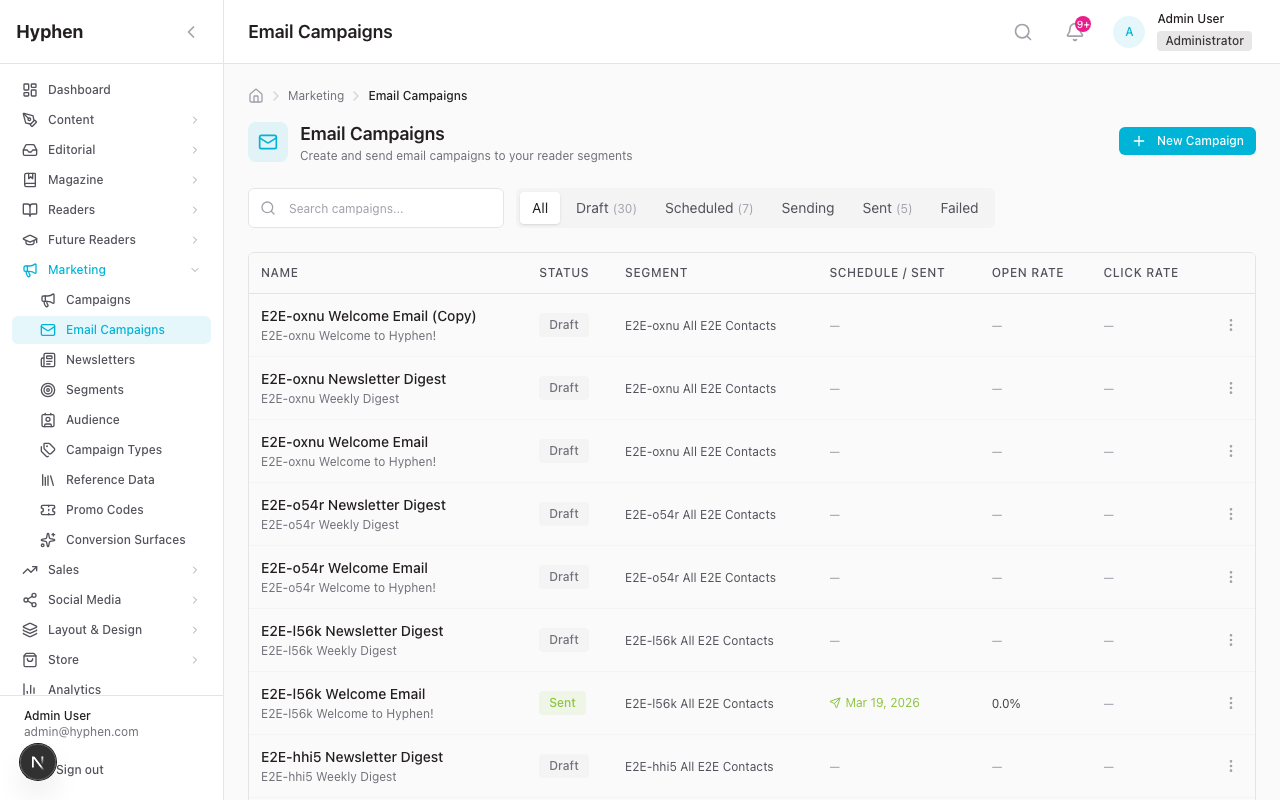
Purpose
Send template-based or custom HTML email campaigns to segmented audiences with scheduling and engagement tracking.
Access
Admin Console → Marketing → Email Campaigns
12.1 View Email Campaigns
- List with columns: Name, Subject, Segment, Status, Sent At, Open Rate, Click Rate
- Status tabs: Draft / Scheduled / Sending / Sent / Failed
- Count badges per tab
12.2 Create Email Campaign
- Click "New Email Campaign"
- Configure:
- Name (required)
- Subject Line (required, supports
{{variable}}interpolation) - Email Template — select from existing templates OR provide custom HTML
- Target Segment — select segment for audience targeting
- Save as draft
12.3 Send Email Campaign
Send Now:
- Open a draft email campaign
- Click "Send Now"
- System resolves segment members
- Enforces newsletter opt-in check (unless
forceSend=true) - Sends emails in batches via SendGrid/SMTP
- Status:
draft → sending → sent
Schedule:
- Open a draft email campaign
- Click "Schedule"
- Set the scheduled date/time
- Status:
draft → scheduled - The
send-scheduled-emailscron picks it up when due - Cron atomically claims the campaign (
scheduled → sending) to prevent double-send - Status:
sending → sent
12.4 Duplicate Campaign
- Click "Duplicate" to create a copy as a new draft
- Useful for recurring campaigns with slight modifications
12.5 Email Campaign Metrics
After sending, the campaign shows engagement metrics:
- Delivered: Emails successfully delivered
- Opened: Unique opens
- Clicked: Unique link clicks
- Bounced: Hard/soft bounces
- Unsubscribed: Recipients who unsubscribed
Metrics are updated via SendGrid/Mailchimp engagement webhooks in real-time.
12.6 Delete Email Campaign
- Only unsent campaigns (draft/scheduled) can be deleted
- Sent/sending campaigns cannot be deleted (for audit compliance)
13. Sub-Module: Newsletter Editions
Purpose
Author newsletter editions in Strapi CMS, manage their lifecycle, send them as email campaigns, and provide a reader-facing archive.
Architecture Note
Newsletter editions use a dual-storage approach:
- Strapi CMS: Source of truth for content authoring (rich text editing, cover images, SEO)
- Admin Console API: Acts as proxy to Strapi, bridges to Prisma
EmailCampaignfor email delivery
Access
Admin Console → Marketing → Newsletters
13.1 View Newsletter Editions
- List with status tabs: All / Draft / Published / Featured / Archived
- Search by title
- Columns: Title, Edition Number, Topic, Status, Publish Date
13.2 Create Newsletter Edition
- Click "New Newsletter"
- Fill in:
- Title (required)
- Edition Number (auto-incremented or manual)
- Topic (for archive filtering)
- Preview Text (teaser shown in archive cards)
- Publish Date
- Cover Image (via Media Picker)
- HTML Content (rich text editor)
- Plain Text Content (fallback for text-only email clients)
- External Archive URL (optional, for linking to external archive)
- Save (creates in Strapi as draft)
13.3 Publish Newsletter
- Open a draft edition
- Click "Publish"
- Uses Strapi v5 publish action API
- Edition becomes visible in the public newsletter archive at
{READER_URL}/newsletters
13.4 Send Newsletter as Email Campaign
- From the newsletters list, click "Send as Campaign" (or from edition detail page)
- A modal appears:
- Select Segment — choose target audience
- Subject Line — defaults to edition title
- Click Send
- System:
- Fetches full content from Strapi
- Creates a Prisma
EmailCampaignwithnewsletterEditionIdfor traceability - Dispatches emails to segment members
- The email campaign appears in the Email Campaigns list for tracking
13.5 Reader Portal Newsletter Archive
- Accessible at
{READER_URL}/newsletters - Topic filter pills: Filter editions by topic
- Edition cards: Show edition number, featured badge, topic tag, title, publish date, preview text
- Pagination: Navigate through archive
- Individual edition page:
{READER_URL}/newsletters/{slug}— renders full HTML content - ISR: Archive page uses Incremental Static Regeneration with 5-minute revalidation
14. Sub-Module: Promotional Codes
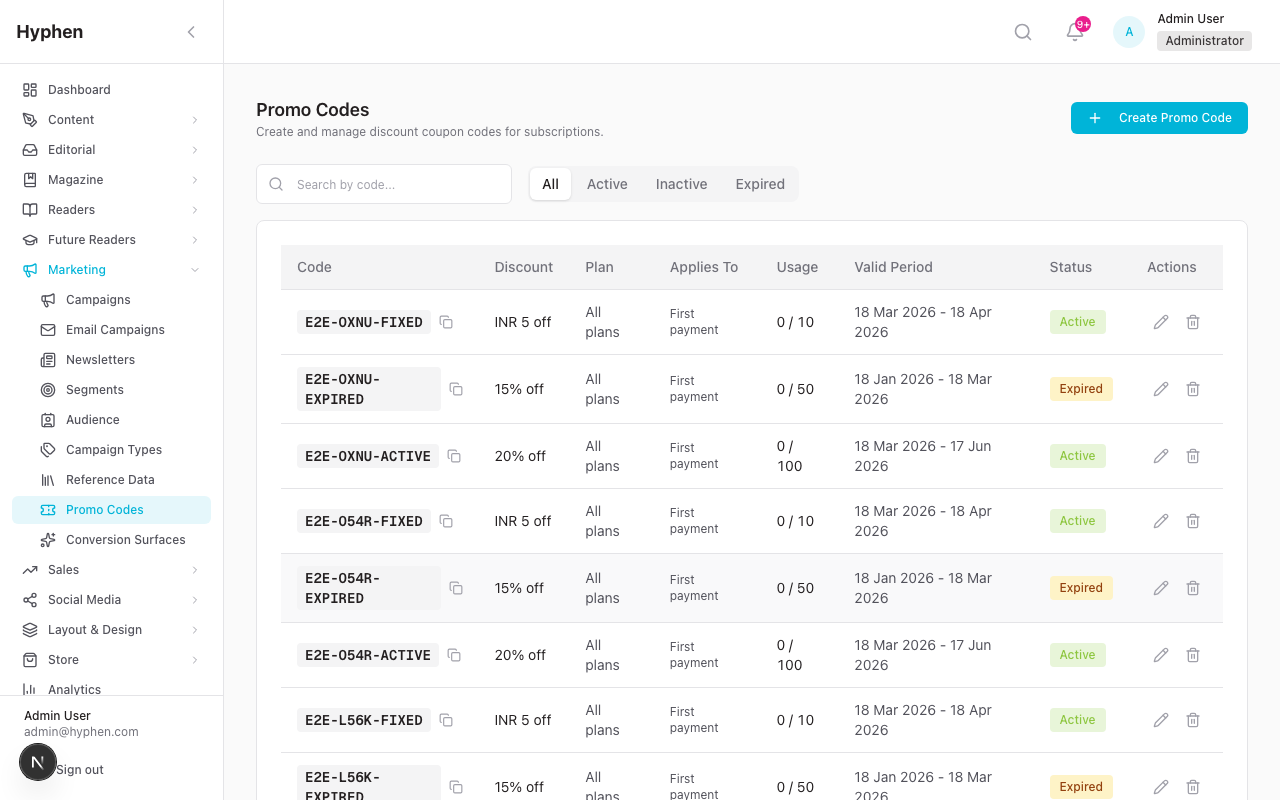
Purpose
Create and manage discount codes for subscription plans. Promo codes can be admin-created (DiscountCoupon) or auto-generated from campaign submissions (PromotionalCode).
Access
Admin Console → Marketing → Promo Codes
14.1 Two Types of Promo Codes
| Type | Model | Source | Purpose |
|---|---|---|---|
| Admin-Created Coupons | DiscountCoupon | Created manually by admins | Reusable discount codes (e.g., WELCOME20) |
| Campaign-Generated Codes | PromotionalCode | Auto-generated from approved campaign submissions | One-time codes tied to individual submissions |
14.2 Create Admin Coupon
- Click "New Promo Code"
- Configure:
- Code (unique, e.g.,
SUMMER2026) - Description
- Discount Type: Percentage or Fixed Amount
- Discount Value (e.g., 20% or $10)
- Linked Plan (optional, restrict to specific subscription plan)
- Billing Interval (optional)
- Max Uses (total redemption limit)
- Max Uses Per User
- Valid From / Valid To dates
- Options: New subscribers only, applies to (FIRST_PAYMENT / N_CYCLES / ALL_RENEWALS), discount cycles, allow gift/bulk/institutional
- Code (unique, e.g.,
- Save
14.3 Campaign Promo Code Auto-Generation
When a campaign submission is approved and the campaign has incentive settings:
- Admin approves submission → clicks "Generate Promo Code"
- System generates a unique code:
{promoCodePrefix}-{random} - Code is saved as
PromotionalCodewith:- Type: percentage, fixed, or trial_days (from campaign incentive settings)
- Value: from campaign
incentiveValue - Validity: from campaign
promoValidityDays - Max redemptions: 1 (single use)
- Code is linked to the submission record
14.4 Public Promo Code Validation & Redemption
Validate (POST /api/promo-codes/validate or POST /api/promo/validate):
- Checks both
PromotionalCodeandDiscountCoupontables - Returns discount type, value, validity
- Rate limited: 20 requests/minute/IP
Redeem (POST /api/promo/redeem):
- For
trial_days: Atomically creates reader account + subscription in a transaction - For
percentage/fixed: Atomically claims redemption slot - Rate limited: 5 requests/15 minutes/IP
15. Sub-Module: Conversion Surfaces
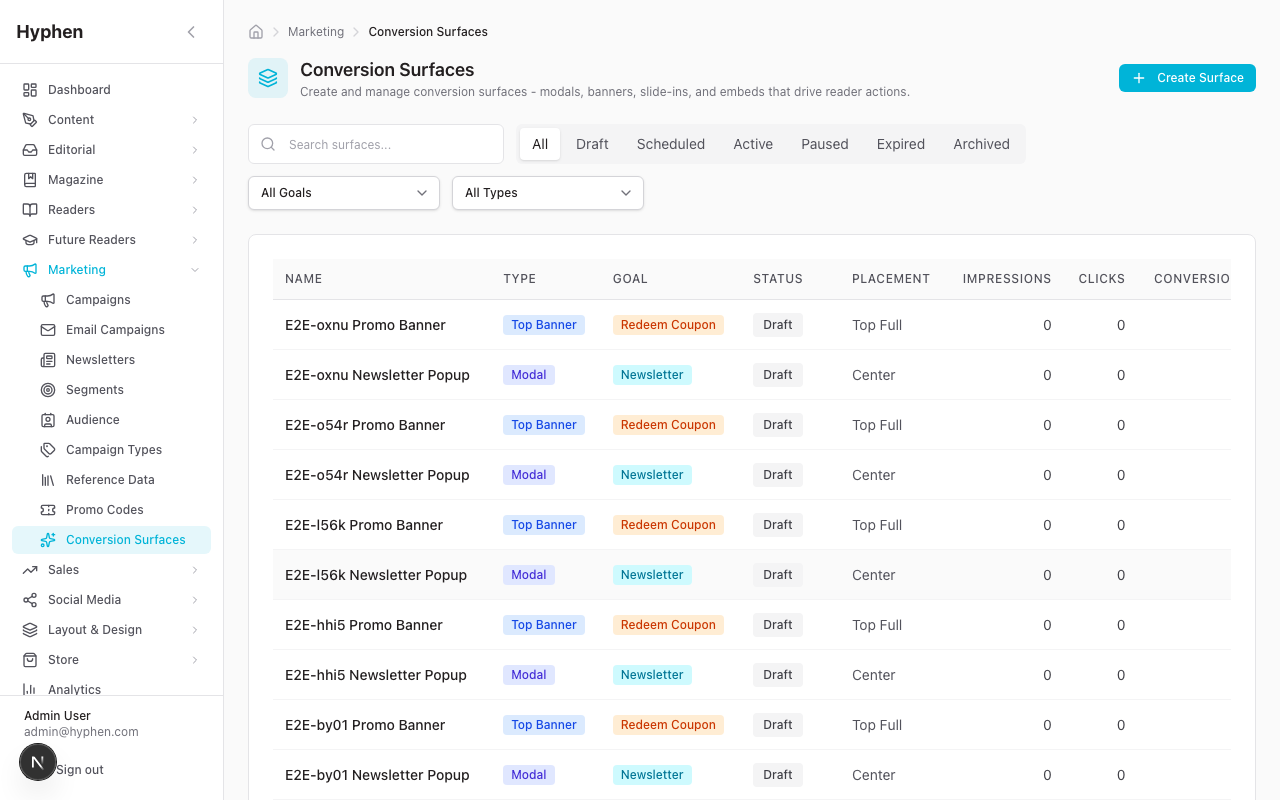
Purpose
Deploy promotional overlays (modals, banners, slide-ins, sticky notifications) on the Reader Portal with sophisticated targeting and trigger rules to drive reader actions.
Access
Admin Console → Marketing → Conversion Surfaces
15.1 Surface Types
| Type | Behavior |
|---|---|
modal | Full-screen overlay with backdrop |
sticky_notification | Persistent notification bar |
slide_in | Corner slide-in panel |
top_banner | Full-width banner at page top |
bottom_banner | Full-width banner at page bottom |
inline_embed | Embedded within page content |
15.2 Create Conversion Surface
- Click "New Surface"
- Configure:
Identity & Presentation:
- Name, Surface Type, Placement
- Title, Subtitle, Body Text
- Image URL
- Primary CTA (text + URL), Secondary CTA (text + URL)
- Background Color, Theme (light/dark/brand)
Conversion Goal:
- register, login, subscribe_paid, subscribe_newsletter, view_campaign, view_event, redeem_coupon, view_product, visit_pricing, custom_cta
Entity Links (optional):
- Linked Coupon (DiscountCoupon)
- Linked Plan (SubscriptionPlan)
- Linked Campaign (OutreachCampaign)
- Linked Event
- Linked Product
- Newsletter Slug
Targeting Rules (JSON):
audiences: anonymous, registered, subscriber, newsletter_subscribed, newsletter_unsubscribedpageTypes: homepage, article, section, etc.deviceTypes: mobile, tablet, desktopincludeUrls/excludeUrls: URL pattern matchingcontentTypes,sections,tags: Content-based targetingutmSource,utmMedium,utmCampaign: UTM parameter matching
Trigger Configuration:
page_load— Show on page load (with optional delay)time_on_page— Show after N secondsscroll_depth— Show after scrolling to N%exit_intent— Show when mouse leaves viewportpage_view_count— Show after N page viewsafter_article_read— Show after scrolling to 100% of articlemanual— Programmatic trigger only
Frequency & Suppression:
- Frequency Limit + Unit (per session/day/week/month)
- Suppress After Dismiss (boolean)
- Suppress After Conversion (boolean)
- Suppress If Already Converted (boolean)
Scheduling:
- Status: draft, scheduled, active, paused
- Starts At / Ends At dates
- Priority (lower number = higher priority)
- Save as draft
15.3 Activate Surface
- Change status from
draft→active(via PUT API) - Surface immediately begins displaying to eligible readers on the Reader Portal
15.4 Reader Portal Rendering
The conversion surface system uses a layered rendering architecture:
- GlobalConversionSurfaces — Wraps the entire Reader Portal root layout
- ConversionSurfaceProvider — React context that:
- Detects device type (mobile/tablet/desktop)
- Counts page views (stored in state, incremented per mount)
- Fetches eligible surfaces from
GET /api/public/conversion-surfaces/eligible - Filters through local suppression checks (localStorage for anonymous, server-side for authenticated)
- Sorts by priority
- Enforces slot-based conflict resolution: one modal at a time, one sticky at a time, banners can coexist
- ConversionSurfaceRenderer — Evaluates trigger conditions and renders the appropriate surface component
Trigger Evaluation:
page_load: Fires after optionaltriggerDelaySecondstime_on_page: Timer starts on mount, fires attriggerDelaySecondsscroll_depth: Monitors scroll position, fires whentriggerScrollPercentis reachedexit_intent: Listens formouseoutevent leaving the viewport (desktop only)page_view_count: Compares provider's page view count againsttriggerPageViewsafter_article_read: Monitors scroll to 100% of contentmanual: Not automatically triggered
Frequency Enforcement:
- Anonymous readers: Client-side via localStorage (per-surface tracking)
- Authenticated readers: Server-side via ConversionEvent records
15.5 Analytics
Dual tracking approach:
- Internal (ConversionEvent table): Stores every interaction with reader context (page, device, UTM, session)
- GA4: Fires custom events for cross-platform attribution
Stats API (GET /api/marketing/conversion-surfaces/{id}/stats):
- Date range filtering
- Time series data
- Breakdowns by device, page, UTM
- Computed rates: CTR, conversion rate, dismiss rate, engagement rate
Denormalized counters on ConversionSurface model:
impressionCount,clickCount,dismissCount,conversionCount- Updated atomically on each event
- Used for fast list view display
15.6 Coupon Integration
Surfaces can link to DiscountCoupon records:
- Eligibility API validates coupon status (active, not expired, usage limit not reached)
- Reader Portal shows copyable coupon code with "Copy Code" button
coupon_copiedevent tracked to both GA4 and internal analytics- Coupon code passed to checkout URL as parameter
16. Sub-Module: Campaign Types
Purpose
Define and manage reusable campaign type categories that appear in the campaign creation dropdown.
Access
Admin Console → Marketing → Campaign Types
Features
- CRUD: Create, read, update, delete campaign types
- Fields: Name (unique), Slug (unique, auto-generated), Description, Icon (Lucide icon name), Active flag, Sort Order
- Seeded Defaults: 5 types seeded from the system enum: Student Outreach, Event Registration, Lead Generation, Institutional, General
- Usage: Campaign types appear in the campaign creation wizard and campaign edit form as a dropdown
- Deletion Protection: Cannot delete a type that is linked to existing campaigns
17. Cron Jobs & Automation
Overview
| Cron Endpoint | Purpose | Auth | Recommended Schedule |
|---|---|---|---|
GET /api/cron/send-scheduled-emails | Send due email campaigns | CRON_SECRET | Every 1–5 min |
GET /api/cron/campaign-status | Auto-complete expired campaigns; send notify emails | CRON_SECRET | Every 15–30 min |
GET /api/cron/send-invitations | Send scheduled campaign invitations | CRON_SECRET | Every 5 min |
GET /api/cron/expire-invitations | Expire overdue invitations | CRON_SECRET | Every hour |
GET /api/cron/invitation-reminders | Weekly reminders for pending invitations | CRON_SECRET | Weekly |
send-scheduled-emails
- Finds all email campaigns with
status = 'scheduled'andscheduledAt <= now - Atomically transitions status to
'sending'(prevents double-send on concurrent cron runs) - Resolves segment members
- Sends emails via SendGrid/SMTP
- Updates status to
'sent'or'failed'
campaign-status
- Finds active campaigns where
endDate < now→ transitions to'completed' - Finds draft campaigns where
endDate < now→ transitions to'archived' - Looks up
CampaignNotifyRequestrecords for campaigns that just became active → sends notification emails usingcampaign_notify_new_campaigntemplate
send-invitations
- Finds invitations with
status = 'scheduled'andscheduledAt <= now - Resolves segment members for each invitation
- Sends invitation emails
- Updates status to
'sent'or'failed'
18. Webhook Integrations
SendGrid Engagement Webhook
Endpoint: POST /api/webhooks/sendgrid
Events Processed:
| Event | Action |
|---|---|
delivered | Updates EmailLog status, increments campaign delivered count |
open | Increments campaign opened count |
click | Increments campaign clicked count |
bounce | Updates EmailLog status to bounced, increments bounced count |
dropped | Logs delivery failure |
spamreport | Logs spam report |
unsubscribe | Increments unsubscribed count |
Authentication: ECDSA P-256 signature verification (optional, controlled by SENDGRID_WEBHOOK_VERIFICATION_KEY)
Mailchimp/Mandrill Engagement Webhook
Endpoint: POST /api/webhooks/mailchimp
Events Processed: send, open, click, hard_bounce, soft_bounce, spam, unsub
Authentication: HMAC-SHA1 signature verification (optional, controlled by MAILCHIMP_WEBHOOK_KEY)
URL Verification: GET /api/webhooks/mailchimp returns 200 OK for Mandrill webhook registration.
19. Reader Portal Rendering
Campaign Landing Pages
URL: {READER_URL}/campaigns/{slug}
Technology: Next.js App Router, Server Component with ISR (60-second revalidation)
Components (24 campaign section components):
| Component | Purpose |
|---|---|
| CampaignHero | Hero image with title/subtitle, status badges, date range |
| CampaignInfo | Rich content rendering (HTML/description) |
| CampaignForm | Dynamic form builder with 12 field types (text, email, phone, select, radio, checkbox, textarea, date, institution_picker, photo_selfie, photo_id_card, file_upload), validation, file upload |
| CampaignCta | Call-to-action with incentive info (state-aware: hidden for expired/paused/completed) |
| CampaignSuccess | Post-submission confirmation with share/copy link |
| CampaignExpired | Expired state with messaging and notify form |
| CampaignUpcoming | Pre-start date state with countdown and notify form |
| CampaignPaused | Paused state with messaging and notify form |
| CampaignCountdown | Real-time countdown timer to start/end |
| CampaignSpeakers | Speaker grid with photos, bios, social links (Twitter/LinkedIn/Website) |
| CampaignSchedule | Multi-day agenda with session types, "Happening Now" indicator, ICS calendar download |
| CampaignVenue | Venue details with Google Maps embed iframe, address, city, directions |
| CampaignWhyAttend | Feature/benefit highlights grid with emoji icons |
| CampaignPartners | Partner logos grouped by tier (Title Sponsor, Partners, Supporters, Media Partners) |
| CampaignLiveStream | Live stream embed (YouTube/Vimeo/custom) with "LIVE NOW" / "Recording" badge |
| CampaignGallery | Post-event photo gallery with lightbox viewer and keyboard navigation |
| CampaignWinners | Awards display (ranked podium / flat grid / categorized groups) |
| CampaignResources | Downloadable resources with type badges (video/article/document) |
| CampaignTestimonial | Testimonial cards with quotes, ratings, and avatars |
| CampaignNotifyForm | Reusable "Get Notified" form for expired/upcoming/paused campaigns |
| CampaignNotifyFormSection | Wrapper for notify form as standalone section |
| CampaignProgramCalendar | Multi-track or timeline calendar view of event schedule |
| CampaignListingGrid | Grid of campaign cards with status badges for campaign listing pages |
| CampaignListingHero | Hero section for campaign listing pages |
Newsletter Archive
URL: {READER_URL}/newsletters
Components:
- NewsletterArchive — Topic filter pills, paginated edition grid
- NewsletterCard — Edition card with number badge, topic, date, preview
- NewsletterArchiveHeader — Page header
- Individual edition:
{READER_URL}/newsletters/{slug}
Programs Discovery Page
URL: {READER_URL}/programs
Features:
- Browse past/ongoing/upcoming campaigns
- Filter by campaign type, status, institute, city, country
- Card grid with status badges, date ranges, type badges
- Links to campaign landing pages
Explore By Language
The homepage "Explore By Language" section (LanguageFilterSection, Figma utility-language-filter) is a horizontally-scrollable row of language cards linking to /languages/{slug}.
Languages are fetched dynamically rather than hardcoded:
- If an admin has set a language override on the section (
displayOptions.languages), that list is used as-is. - Otherwise the section calls
GET /api/articles/languages(Reader Portal route, 5-minute ISR cache) which returns the distinct languages that actually appear on published articles. - If that call returns nothing or fails, it falls back to the built-in platform default list (Tamil, Bengali, Malayalam, Marathi, Hindi, Kannada, Telugu, Gujarati, English).
The practical effect: the language strip stays in sync with the content you actually publish, with no manual upkeep — a language only appears once at least one published article uses it.
Conversion Surfaces
Renders globally across all Reader Portal pages via GlobalConversionSurfaces in the root layout.
See Section 15.4 for detailed rendering behavior.
20. Business Logic & Rules
Campaign Validation Rules
- Campaign slug must be unique across all campaigns
- Start date must be before end date
- At least one form field required before publishing
- Status transitions follow a strict state machine (see Section 4)
- Cannot delete a campaign that has submissions (use archive instead)
Segment Resolution Rules
- Filters use AND logic between groups, OR logic within a group
- When source includes "audience contacts", queries both Reader and AudienceContact tables
- Members are resolved dynamically at query time (not cached lists)
- Segment cannot be deleted if used by active campaigns or invitations
Email Campaign Rules
- Cannot update or delete sent/sending campaigns
- Scheduled campaigns are atomically claimed by cron to prevent double-send
- Newsletter opt-in is enforced by default (unless
forceSend=true) - Template variables use Handlebars syntax:
{{variable_name}}
Conversion Surface Rules
- Slot-based conflict resolution: Maximum one modal, one sticky notification active simultaneously; banners can coexist
- Priority: Lower number = higher priority; when multiple surfaces compete for a slot, highest priority wins
- Frequency capping: Configurable per session/day/week/month
- Suppression: Can suppress after dismiss, after conversion, or if already converted
- Targeting: AND between dimension types, OR within a dimension
- Soft delete: Archive instead of hard delete (preserves analytics history)
Promotional Code Rules
- Campaign-generated codes are single-use (maxRedemptions = 1)
- Admin coupons can have configurable max uses and per-user limits
- Validation checks: code exists, is active, not expired, usage limit not reached
trial_daysredemption atomically creates reader account + subscription- Rate limiting on public validation (20/min) and redemption (5/15min)
Contact/Audience Rules
- Email must be unique across audience contacts
- Inactive contacts (isActive = false) are excluded from segments
- Unsubscribed contacts are excluded from non-forced email sends
- Auto-upsert from campaign submissions and newsletter signups is non-blocking (failures don't break primary flow)
21. End-to-End User Flows
Flow 1: Create and Launch an Outreach Campaign
1. Create Campaign Type (if needed)
   Marketing → Campaign Types → Add → "Conference"

2. Build Audience Segment
   Marketing → Segments → New Segment
   → Filter: Account Status = Active, Subscription = None
   → Save as "Non-Subscribers"

3. Create Campaign
   Marketing → Campaigns → New Campaign
   → Step 1: Name, Slug, Type, Dates
   → Step 2: Form Fields (Name, Email, Phone, Institution)
   → Step 3: Landing Page (Hero, Content, Success/Expired messages)
   → Step 4: Event Details (Speakers, Schedule, Venue) — if event
   → Step 5: Post-Event Content — skip for now
   → Step 6: Incentive (Free Trial, 30 days)
   → Step 7: Review → Create

4. Configure Landing Page Template
   Campaign Detail → Layout & Style tab
   → Select template → Save

5. Publish Campaign
   Campaign Detail → Click "Publish"
   → Validates → Status = Active
   → Copy landing page URL

6. Send Invitations
   Campaign Detail → Invitations tab → New Invitation
   → Select "Non-Subscribers" segment
   → Compose email → Send

7. Share on Social
   Campaign Detail → Social tab
   → "Create Social Campaign" → "Compose Post"
   → Pre-filled with campaign name/URL → Publish

8. Monitor
   Campaign Detail → Statistics tab → View submissions count
   → Submissions tab → Review & approve submissions
   → Generate promo codes for approved submissions

9. Complete Campaign
   After end date: Click "Complete"
   Add post-event content (gallery, winners, resources)
   Campaign page shows recap state
Flow 2: Newsletter Edition → Email Campaign
1. Create Newsletter Edition
   Marketing → Newsletters → New Newsletter
   → Author content in form
   → Save as draft

2. Publish
   Newsletter detail → Click "Publish"
   → Visible at `/newsletters/{slug}`

3. Send as Email Campaign
   Newsletters list → "Send as Campaign" button
   → Select target segment
   → Confirm subject line
   → Send

4. Track Engagement
   Marketing → Email Campaigns
   → Find campaign → View open/click/bounce metrics
Flow 3: Deploy a Conversion Surface
1. Create Coupon (optional)
   Marketing → Promo Codes → New Code
   → Code: "SAVE20", 20% off

2. Create Conversion Surface
   Marketing → Conversion Surfaces → New Surface
   → Type: Modal, Theme: Brand
   → Title: "Subscribe & Save 20%"
   → Link coupon: "SAVE20"
   → Goal: subscribe_paid
   → Targeting: anonymous + homepage + desktop
   → Trigger: exit_intent
   → Frequency: 1 per week
   → Suppress after conversion

3. Activate
   Set status to "active"
   → Surface appears to matching readers on Reader Portal

4. Monitor
   Conversion Surfaces list → View impression/click/conversion metrics
   → Detail → Stats → Time series, breakdowns
Known Limitations
Planned but Not Yet Implemented
| Feature | Status | Notes |
|---|---|---|
| A/B Testing for Conversion Surfaces | Planned | Run multiple variants with statistical significance tracking |
| Geographic Targeting | Planned | Target conversion surfaces by reader location |
| Webhook Events for Campaign Lifecycle | Planned | Events: created, activated, conversion, milestone |
| Admin Preview for Conversion Surfaces | Planned | Preview surface rendering before activation |
| Content-Aware Inline Embed Positioning | Planned | Auto-position inline embeds based on article structure |
Current Limitations
- No real-time websocket notifications — Notification bell uses polling, not push
- Newsletter content authoring requires Strapi — No built-in rich text editor for newsletters in Admin Console
- Conversion surface preview — You cannot preview a surface's appearance in Admin Console before activating
- Campaign form field types — No conditional logic (show/hide fields based on other field values)
- Segment caching — Segments resolve dynamically on every query; large segments may have latency
- Email campaign retry — Failed campaigns must be manually retried (no automatic retry)
- Invitation tracking — Individual recipient open/click tracking depends on email provider webhook reliability
- Conversion surface inline embed — Requires manual template configuration; no automatic content-aware positioning